The short answer: create a budget on the Budgets page (
/[organization]/budgets) with three fields — Budget Name, Max Spend, Duration — then attach it to an organization, a team, a user, or a single API key. Organization, team and user budgets reject with402and codebudget_exceeded. A per-key budget rejects with429and codekey_budget_exceeded. The status code differs by scope, so branch on thecodefield, never on the number.
The short answer
A hard spend limit is not a monitoring feature. It is a refusal: past the number you set, the gateway stops calling providers on your behalf, before any money moves and before any provider sees the request. That refusal is what bounds the worst case, and the worst case is the only thing worth designing for — a runaway agent loop, a key pasted into a public repository, a batch job that retries forever because nobody wrote an exit condition.
Everything else in this guide is mechanics: which of the four scopes to attach a cap to, which window to reset it on, what happens at the line, and how to watch it fire on a throwaway key so you are relying on a control you have seen work rather than a form you filled in once. If you want the wider map first — how a budget sits alongside your credit balance, your rate limits and your guardrails — read the four pre-flight gates and come back.
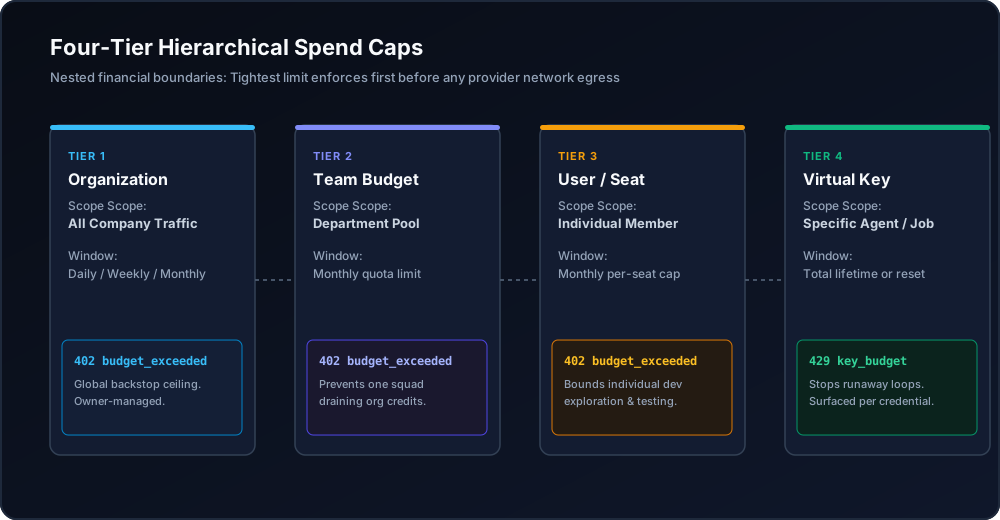
Figure 1: Four-tier hierarchical budget architecture enforcing spend boundaries from individual keys to company-wide balances.
When you need this
Three situations bring people to this page, and they need different caps.
The first is a bill that arrived larger than anyone expected. Nothing broke; usage simply grew faster than the person watching it. This is a monthly cap at organization scope with a soft threshold underneath it — a backstop, not a handbrake, because the goal is early warning rather than a hard stop on real traffic.
The second is one team quietly consuming everything. The account is funded and the total is defensible, but a single squad's experiment has absorbed the headroom three other squads were counting on. An organization cap does nothing here by construction: it caps the total, and the total is fine. This needs a cap per team.
The third is an automated key you do not fully trust. A nightly batch, a CI job, a demo key handed to a customer, an agent that decides its own next call. Here the right unit is the key, the right duration is often Daily or Total, and the number should be small enough that the worst case is uninteresting. Blast-radius reasoning for keys is in virtual keys vs master key.
Most production accounts end up with all three at once, stacked. A request is rejected if it exceeds any budget that applies to it, so stacking is safe and the tightest applicable cap is the one that binds.
What you need first
You can read this guide with nothing. To run it you need four things.
- A funded organization. nRouter is credit-based and signup is card-required: the minimum credit purchase is $5. The platform fee rides on top of the purchase rather than being skimmed out of it — see Pricing and Billing and Credits.
- Owner or admin role, if you want to cap at organization, team or user scope. Those three are restricted by scope-ownership enforcement. A key-level budget can be set by a member on their own key at creation; editing it afterwards is again owner or admin. Roles are in Team Management.
- At least one virtual key from
/[organization]/keys. The fullsk-nrouter-…value is displayed exactly once, at creation. Mechanics in API Key Management. NROUTER_API_KEYin your shell. Every code block below runs as written againsthttps://api.nrouter.ai/v1.
export NROUTER_API_KEY="sk-nrouter-your-key-here"

curl -sS https://api.nrouter.ai/v1/models \
  -H "Authorization: Bearer $NROUTER_API_KEY" | head -c 300
A model list means you are ready. A 401 means the key is wrong or revoked —
check Authentication.
Step 1 — Decide the scope before you decide the number
The scope is the decision; the dollar figure is arithmetic afterwards. Pick the scope by asking who you are protecting from whom.
| Scope | Caps | Reach for it when | Who can set it |
|---|---|---|---|
| Organization | Total spend across the whole account | You want one number the invoice can never exceed | Owner / admin |
| Team | Every key belonging to one team | One squad should not be able to spend another squad's headroom | Owner / admin |
| User | One member's spend inside the org | Per-person allowances, contractors, trials | Owner / admin |
| API key | A single virtual key | A batch job, a CI runner, an agent, a customer demo | Key owner at creation |
A useful default for a small engineering org is three layers: an organization monthly cap as the invoice ceiling, a monthly cap per team below it, and a daily or total cap on every automated key at the bottom. The layers do not need to sum to anything in particular — budgets do not reserve credits, so an unallocated remainder simply stays available to keys that have no budget of their own.
That last point catches people out. A $1,000 balance with a $300 team cap and a $500 team cap has $200 that is not budgeted, and that $200 is spendable by any key without a budget. Budgets cap; they do not ring-fence. The distinction, and why the credit balance is a separate control entirely, is in gateway credits vs prepaid tokens.
It is worth naming the alternative design so you can tell which one you are looking at, because the two are easy to confuse. Azure's model quota genuinely is allocated: "you assign TPM to each deployment as it is created, and the available quota for that model is reduced by that amount", so creating a new deployment means "reducing the TPM assigned to other deployments of the same model (thus freeing TPM for use)" (manage quota). That is a reservation: one consumer's allocation is subtracted from another's. A spend budget is the opposite — an independent ceiling with no claim on the balance behind it — and expecting subtraction from something that only caps is how a team ends up over-committed on paper and under-protected in practice.
Step 2 — Create the budget on the Budgets page
Open Budgets at /[organization]/budgets and click Create Budget. Three
fields do the work.
| Field | What it means | Example |
|---|---|---|
| Budget Name | The label that appears inside the error message when it fires | Backend API — Monthly |
| Max Spend | The hard cap in USD | $500.00 |
| Duration | When the counter resets | Monthly |
Choosing Max Spend honestly means doing the arithmetic against a real rate card, not a feeling.
Model prices are published per million tokens and vary by more than an order of magnitude between
the small and flagship tiers of a single vendor — OpenAI lists gpt-5.4-mini at $0.15 in and $0.60
out per 1M tokens on its pricing page, and Anthropic
publishes a comparable per-MTok table plus the multipliers that change the answer: a 50% Batch API
discount and a cache read billed at 0.1x the base input rate
(pricing). Take your measured token
volume, price it at the model you actually call, then set the cap above that with headroom — not the
other way round.
Name it for the thing it protects, not for the number. The name is quoted back to
you in the rejection body, so Nightly Batch — Daily tells an on-call engineer at
3am exactly which cap fired and which job to look at, while Budget 4 tells them
to open the dashboard and start guessing.
Then assign the budget to a key or a team, or set it at organization or user scope. Assignment is what turns a number into a control.
Step 3 — Pick the duration deliberately
Duration decides when the counter goes back to zero, and the four options are not interchangeable.
| Duration | Resets |
|---|---|
| Daily | Midnight UTC, every day |
| Weekly | Midnight UTC each Monday |
| Monthly | The 1st of the month at midnight UTC |
| Total | Never — a hard lifetime cap |
Daily is the right default for anything automated. A daily cap turns an unbounded failure into a bounded one: the worst a broken loop can do is spend one day's allowance, and tomorrow it gets another chance to behave. Monthly suits product lines and teams where the natural unit of accountability is the invoice period. Total is the one people underuse — it never resets, which makes it the correct cap for a proof of concept, a fixed-scope project, or a key you handed to someone outside the company. Set it once at $100 and the exposure is $100, in perpetuity, with no calendar involved.
Note the UTC boundaries. A daily cap does not reset at midnight where you are, and a team that reliably runs its heaviest batch at 23:00 local time may be straddling two budget days without realising it.
Step 4 — Choose an enforcement mode, and a soft threshold under it
A budget also decides what happens at the cap. Three modes ship, and only one of them is a spend limit.
| Mode | At the cap | Use it for |
|---|---|---|
| Block | The request is rejected — 402 at org/team/user scope, 429 at key scope | Production backstops. The default. |
| Warn | An alert fires; requests keep flowing | Visibility while a team negotiates its allowance |
| Throttle | An alert fires and the budget is flagged for rate reduction; no hard block | A high-traffic key you do not want to cut off entirely |
If the requirement is "this can never cost more than X", the mode is Block. Warn is a monitor with a nice name, and a Warn budget described in a planning document as a spend cap is the most common way a team ends up believing it has a control it does not have.
Underneath the cap, configure soft thresholds — 50%, 80% and 100% is a reasonable set. Each crossing dispatches an alert to your connected channels while requests keep flowing, which is what buys you the chance to act before anything is rejected. Wire the destinations under Observability → Alerts → Channels: Email, Slack, Microsoft Teams, Jira, or a generic webhook. Details in Alerts and Notifications.
This is the same discipline Google's SRE book calls keeping a safety margin: "using a tighter internal SLO than the SLO advertised to users gives you room to respond to chronic problems before they become visible externally" (Service Level Objectives). The chapter's other advice transfers cleanly too — "it's better to start with a loose target that you tighten than to choose an overly strict target that has to be relaxed" — which is an argument for shipping a generous cap this week rather than a perfect one next quarter.
Budgeting is also not a control you invent per company. The FinOps Foundation's framework lists Budgeting and Forecasting as named capabilities under Quantify Business Value, sitting downstream of allocation and anomaly management under Understand Usage & Cost (FinOps Framework) — which is the same ordering this guide uses: know who spends what, forecast it, then cap it.
The pairing to internalise is: thresholds tell a human, the mode tells the gateway. Neither substitutes for the other.
Step 5 — Pair every dollar cap with a rate limit
A budget bounds a window. It does not bound a minute, and that gap is where the expensive incidents live. A retry loop firing two thousand times in ten minutes stays comfortably inside a $5,000 monthly cap right up to the moment it does not, and by then the money is spent. The dollar cap was never violated; it was simply consumed at a rate nobody intended.
Velocity is a separate control. Set RPM (requests per minute) and TPM
(tokens per minute) on the key when you create or edit it. Both use a sliding
window; exceeding either returns 429 with rate_limit_exceeded and a
Retry-After header:
{
  "error": {
    "message": "Rate limit exceeded. Retry after 12 seconds.",
    "type": "rate_limit_error",
    "code": "rate_limit_exceeded"
  }
}
Plan tier sets the defaults and a limit set explicitly on a key overrides them. The important property is that a rate limit is not overridable per request — it is a boundary, not a parameter the caller can pass. That is exactly what makes it useful against a key you no longer control. The decision framework for reaching for one control versus the other is in budgets vs rate limits, and the per-scope mechanics are in RPM and TPM rate limiting.
Verifying it worked
A cap you have never watched fire is a hypothesis. Prove it on a disposable key, in five minutes, before you rely on it.
- Create a throwaway key on
/[organization]/keysand name itcap-testso you can revoke it without thinking about it afterwards. - Attach a
$0.01budget with DurationTotaland modeBlockto that key from/[organization]/budgets. - Send two calls. The first should succeed and settle above a cent; the second should be rejected.
for i in 1 2; do
  curl -s -o /dev/null -w "attempt $i → %{http_code}\n" \
    https://api.nrouter.ai/v1/chat/completions \
    -H "Authorization: Bearer $NROUTER_API_KEY" \
    -H "Content-Type: application/json" \
    -d '{"model":"gpt-5.4-mini","messages":[{"role":"user","content":"ping"}]}'
done- Read the rejection body, not just the status. A per-key budget returns
429, and the body names the budget, the window, the amount used and the limit:
{
  "error": "Team budget 'Data Science — Monthly' (monthly) exceeded: $2000.12 used of $2000.00 limit.",
  "code": "budget_exceeded",
  "request_id": "req_..."
}- Repeat at team scope and confirm you get
402withbudget_exceededinstead. Watching both codes once is what stops you writing retry logic that treats them identically. - Confirm the successful path still prices correctly. Read the cost header off an ordinary call:
curl -sS -D - -o /dev/null https://api.nrouter.ai/v1/chat/completions \
  -H "Authorization: Bearer $NROUTER_API_KEY" \
  -H "Content-Type: application/json" \
  -d '{"model":"gpt-5.4-mini","messages":[{"role":"user","content":"ping"}]}' \
  | grep -i '^x-nr-'
x-nr-request-cost carries the settled cost in USD and pairs with
x-nr-cost-status. When a call cannot be priced the cost header is absent —
that is unpriced, and it is not the same as zero. Then revoke cap-test.
For the live view, open Advanced → Budgets at
/[organization]/advanced/budgets. The enforcement panel shows your org spend
meter, the top team budget with its utilisation, how many budgets are rejecting
requests right now, and the Block/Warn/Throttle split. Because a budget block
happens at pre-flight, before any provider call, a blocked request writes no spend
log — so the panel reports what is blocking now rather than a historical count.
Request-level outcomes live in the request logs at /[organization]/logs.
What goes wrong
You expected a budget to return 429 everywhere. It does not, and this is the
single most consequential detail on the page. Organization, team and user budgets
return 402 with budget_exceeded; only a per-key budget returns 429 with
key_budget_exceeded. Client code that branches on the status number alone will
mishandle one of the two. Branch on code. The full client-side playbook is
429 vs 402 on an LLM gateway.
You retried a budget rejection with exponential backoff. A budget block is a policy outcome, not a transient failure. It will return the same code on every call until the window resets or a human raises the cap, so backoff produces a tight pointless loop that adds latency and achieves nothing. Surface it to an operator instead.
You set the cap at the wrong scope. An organization budget cannot stop one team consuming the whole account, because the account total is exactly what it measures. If the concern is a team, the budget belongs at team scope with the org cap sitting above it as the last resort. Scope resolution is covered in org, team, member.
You used Warn and called it a cap. Warn alerts and keeps serving. It is a reasonable mode while a team sorts out its allowance and the wrong mode as a runaway-spend backstop.
You assumed a budget reserves credits. It does not. Budgets cap spend; the credit balance is a separate pool, and unbudgeted credits stay spendable by keys without a budget. If the requirement is "this money is spoken for", express it as a budget on every key that could otherwise reach it.
You read a missing cost header as a free request. Reporting code that defaults
an absent x-nr-request-cost to 0.0 will under-report spend in your own
dashboards while the ledger stays correct. Treat absent as unknown and reconcile
against the ledger — see
how to read your credit ledger.
Try it
Budgets, rate limits, guardrails, A/B tests, prompt management and evals are on
every plan. Every plan pays the same 4% platform fee on credits, charged on top;
plans vary the monthly nrouter/auto allowance — subscriptions from $20/mo — and
the default rate limits, never the feature set. The
reasoning behind that choice is in
Every Feature on Every Plan: We Charge a Fee, Not a Gate.
Load the $5 minimum, then do the five-minute exercise above: create a key, attach a one-cent total budget, and watch the second call get refused. Start at app.nrouter.ai/signup, or send a first call from the browser in the Playground. Questions about which scope fits your failure mode? Ask in the nRouter community.
See also
- Credits, Budgets, Rate Limits, Guardrails: Four Pre-Flight Gates — the map this guide sits inside, and why passing one gate says nothing about the other three.
- Budgets vs Rate Limits: Pick the Control, Then Set Both — a decision guide for when a dollar cap and a velocity cap would both technically work.
- 429 vs 402 on an LLM Gateway: Which to Retry, Which to Stop — the client half, so a budget block is never retried like a throttle.
- Reserve-and-Settle: Never Overspend a Credit Balance — why a cap holds under concurrency instead of letting parallel calls race the same balance.
- Org, Team, Member: Scoping Keys, Budgets, Guardrails — how scope is resolved, which decides whether your cap fires as
402or429. - Auto Top-Up Without Surprise Bills: Threshold, Amount, Cap — the other half of spend safety: keeping the balance funded without turning it into an uncapped line of credit.
- Pricing — the platform fee and the plan-level rate-limit defaults referenced throughout.
Sources
Verified 2026-06-14. Every field name, status code, duration and enforcement mode attributed to nRouter comes from our own documentation or pricing page; the external references below are cited for the specific claim each supports. If something has drifted, email hello@nrouter.ai and we will correct it.
External
- An allocated quota that IS subtracted from a shared pool — the design a spend budget is not: Manage Azure OpenAI in Microsoft Foundry Models quota
- Published per-token rate cards for the cap arithmetic: OpenAI pricing · Anthropic pricing (including the 50% Batch discount and 0.1x cache-read rate)
- Keeping a safety margin under the advertised boundary, and starting loose rather than strict: Google SRE Book — Service Level Objectives
- Budgeting and Forecasting as capabilities downstream of allocation: FinOps Framework
nRouter
- Budget fields, scopes, durations, enforcement modes and status codes: Budget Controls
- Alert channels and threshold delivery: Alerts and Notifications
- Credit balance, platform fee and the $5 minimum: Billing and Credits
- Key creation, RPM/TPM fields and rotation: API Key Management
- Response headers, including the cost header: Chat Completions API
- Plans and the platform fee: nrouter.ai/pricing