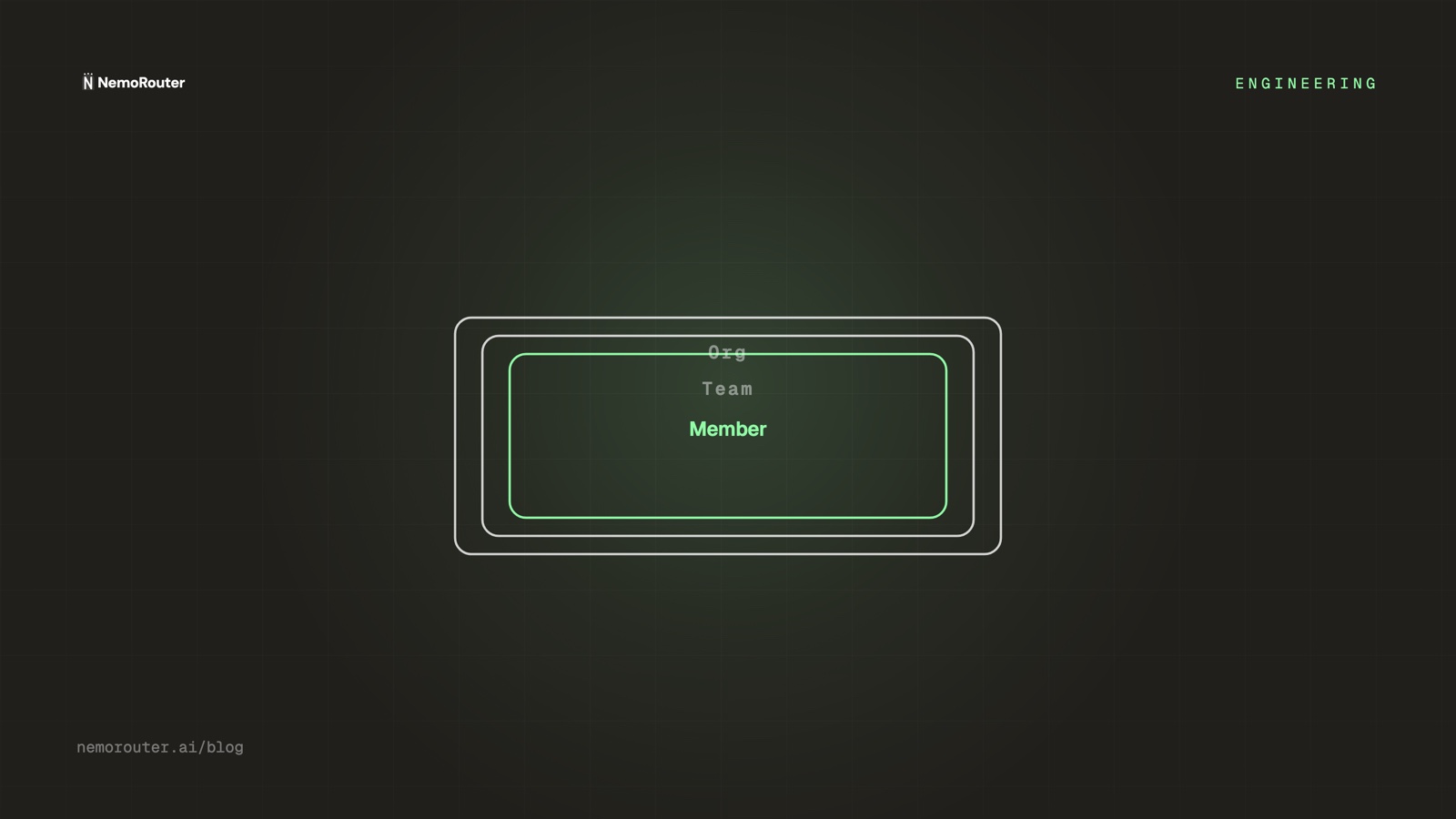
The answer: three nested scopes. The organization owns money — credits, billing, the plan. A team owns the keys, budgets and policies its people work with. A key owns its own limits and carries its own spend. A control attaches at the scope whose blast radius it is meant to bound, the most specific policy wins, and the team a request is attributed to comes from the authenticated key rather than anything in the request.
Single-level tenancy — you are in the organization or you are not — survives exactly as long as one team. It is the right model for a two-person company and it is the wrong model roughly one week after the second team exists, at which point the questions arrive all at once. Should the data-science squad see the checkout service's keys? Whose budget did that spike come out of? The contractor needs one model on one project; what exactly do we hand them?
Those are not configuration questions. They are structural ones, and a product that answers them with "give everyone everything and be careful" is asking every customer to build an access-control layer on top of it. This post is the shape nRouter uses instead: what nests inside what, which control attaches at which level, the one rule that makes attribution trustworthy, and the cases where the model genuinely constrains you.
The contractor who could see everything
Here is the concrete request, and it is a dashboard action rather than an API call, which is part of why it is easy to miss.
A four-week contractor joins to build one internal tool. They need a key for one model. In a flat organization the sequence is: invite them, they land in the organization, and the API keys page now lists every key on the account — the production checkout key, the data-science research keys, the key the CI pipeline uses. They can read the organization's spend. They can see which models the company is evaluating, which is competitive information. If the role they were given can edit keys, they can edit any of them.
Nobody did anything wrong. The invitation was the only mechanism available, and it grants the only scope that exists. The blast radius of "add one contractor for four weeks" is the entire account, because the account is the only unit the model knows about.
The same shape produces the quieter, more common incident: a staging job configured with the production key, exhausting the budget that production depends on, at a moment nobody is watching. That is not a permissions failure at all — it is the absence of a boundary to attach a separate budget to. Both problems have the same root, which is that there is nowhere between "one credential" and "the whole company" to put anything.
Why a flat organization breaks at two teams
Teams reach for workarounds first, and each one fails in a way worth naming, because recognising your own workaround in this table is usually what motivates the migration.
| Workaround | Where it fails |
|---|---|
Naming conventions (ds-*, prod-*) | A convention is not a boundary; nothing stops the wrong person using the wrong key |
| One organization per team | Now credits, billing and the plan are fragmented; nobody can see total spend |
| A shared spreadsheet of who owns what | Correct on the day it is written, wrong within a month, and never consulted during an incident |
| Application-side filtering | Every surface has to remember; the newest surface never does |
| One key per person | Spend is attributed to people rather than workloads, which is not the question anyone asks |
The last two deserve a sentence each. Application-side filtering fails by omission rather than by error — the code that forgets the filter is not wrong-looking, it is simply missing a clause, and it passes review because reviewers check what is there. And one key per person conflates who ran it with what ran it, which produces reports that cannot answer "what does the checkout feature cost" no matter how you slice them. The attribution model that does answer it is Attribute LLM Spend by Team, Customer, and Feature.
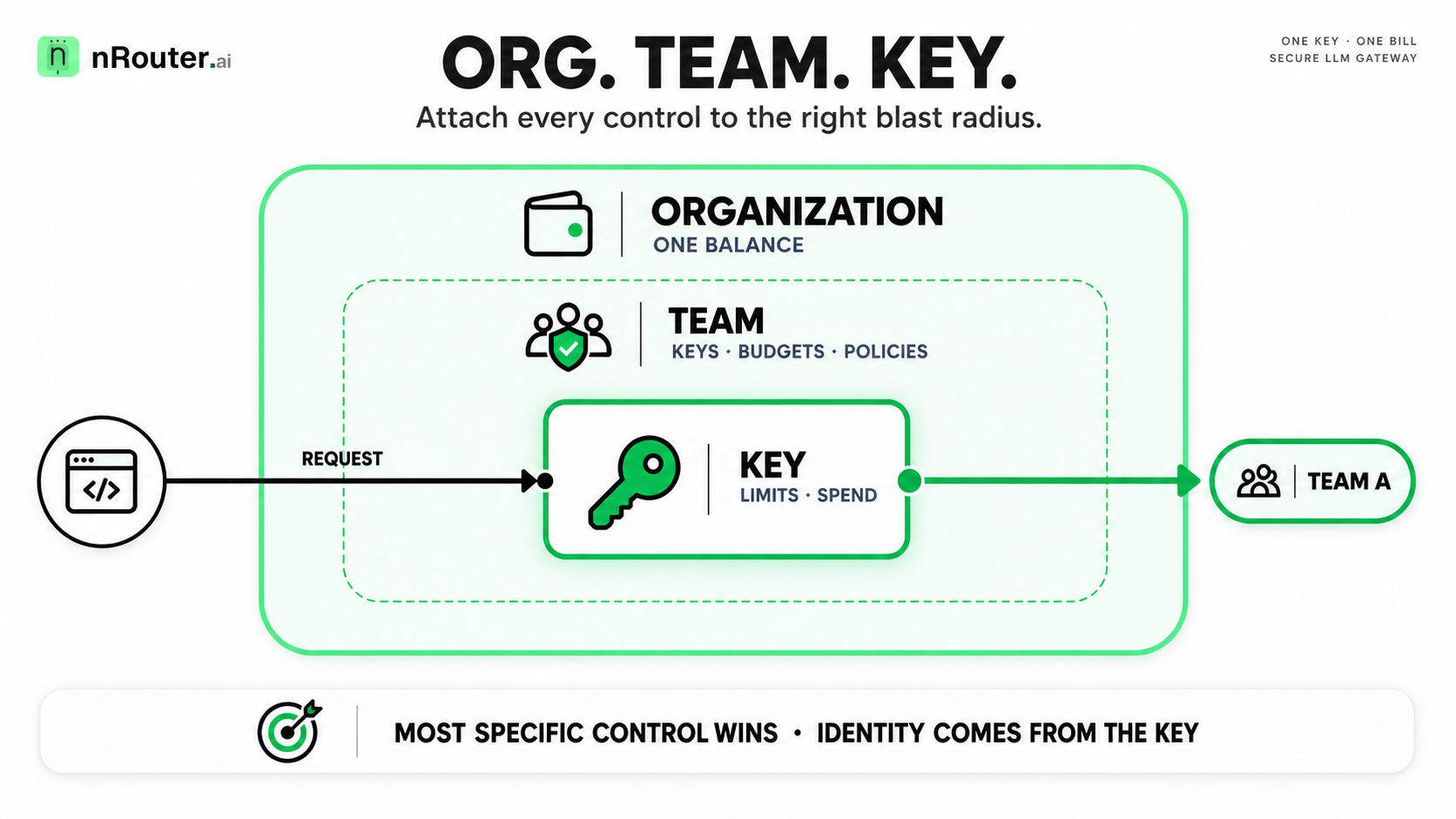
Figure 1: Three-tier resource scoping isolation governing virtual keys, spend ceilings, and guardrails across team boundaries.
The hierarchy, and what attaches where
Three levels, each nested inside the one above:
ORGANIZATION            one billing entity, one credit balance, one plan
 └─ TEAM                a "Default" team always exists; more are created as needed
     └─ MEMBER          each person is in exactly one team within the organization
         └─ KEY         each key belongs to exactly one team

controls attach at the level whose blast radius they bound:
   organization  ·  credits, billing, plan, organization-wide budgets
   team          ·  keys, team budgets, team guardrails, team model access
   key           ·  per-key RPM/TPM, per-key budget, per-key model allowlist, spend
The rule that generates all of it: attach the control at the level whose blast radius it is meant to bound.
| Control | Scope | Why that level |
|---|---|---|
| Credits, billing, plan | Organization | One bill, one balance; splitting it means splitting the company |
| Virtual keys | Team | A key belongs to the group that operates it, not to a person |
| Budgets | Org / team / user / key | Cap at whichever radius you actually mean |
| Guardrails | Key > team > org | A strict case overrides a loose default without weakening it |
| Rate limits | Org / team / key | Every applicable ceiling must be cleared; tightest wins |
| Spend attribution | Key | The workload is the unit anyone asks about |
Two invariants keep this unambiguous. Every person belongs to exactly one organization and exactly one team within it — there is no multi-team membership to reason about, and no organization or team switcher in the interface. Changing someone's team is an action an Owner or Admin takes on their behalf, not something the member does to themselves mid-session.
That second invariant costs something, and the cost is real: a genuine platform engineer who works across three squads has one team, and the way to give them reach is a role rather than a membership. We took that trade because ambiguity in "which team is this request billed to" is worse than inconvenience in "which team is this person on". Every authorisation and every attribution decision has exactly one answer, always.
The precedence direction — key beats team beats organization — is the same one used for content policy in Inline LLM Guardrails: Redact, Block, or Flag Every Request and for velocity in RPM and TPM Rate Limiting Per Key, Team, and Org. One mental model, applied to every scoped control, so learning where a rate limit comes from teaches you where a guardrail comes from.
Roles: Viewer, Member, Admin, Owner
Scope answers which resources. Role answers what you may do to them. Four roles, with increasing authority:
| Role | Can read | Own keys | All keys | Invite | Budgets & guardrails | Delete org / billing |
|---|---|---|---|---|---|---|
| Viewer | analytics, logs | — | — | — | — | — |
| Member | analytics, logs, playground | yes | — | — | — | — |
| Admin | everything | yes | yes | Viewer, Member | yes | — |
| Owner | everything | yes | yes | Viewer, Member, Admin | yes | yes |
Three details that are not obvious from the grid and that people hit in their first month:
Role changes are reserved for the Owner. An Admin can invite and remove members but cannot promote or demote an existing one — they see each member's role as a read-only badge. That prevents the privilege-escalation path where an Admin promotes themselves or a peer to Owner, which is the most common way a four-role model quietly becomes a two-role model.
An Admin cannot grant the Admin role. Only an Owner can. Same reasoning, one level down.
Every organization has exactly one Owner, and a last-owner guard prevents the final Owner from being removed or demoted. An ownerless organization is an organization where billing cannot be changed and the account cannot be closed. Transferring ownership is a deliberate, supported action rather than a self-service toggle — contact support@nrouter.ai and we make the change. The full role reference is Team Management.
Worked example: scoping a 14-person organization
Abstract hierarchies are easy to agree with and hard to apply, so here is a real one. Fourteen people, three teams, one contractor, on Pay as you go.
ACME  (organization — one balance, one plan, one bill)
│
├── Platform            5 people   Admin: 1
│   ├── prod-gateway        key    RPM 200   budget $800/mo
│   ├── prod-batch          key    RPM  60   budget $300/mo
│   └── ci-smoke            key    RPM  10   budget  $20/mo
│
├── Data Science        6 people   Admin: 1
│   ├── ds-research         key    RPM 120   budget $400/mo
│   └── ds-eval             key    RPM  60   budget $150/mo
│   └── team budget                          $500/mo   ← caps the team, not each key
│
└── Vendor-Q            3 people   (2 contractors + 1 internal Member)
    └── vendor-tool         key    RPM  30   budget  $50/mo
        allowed models:  claude-sonnet-4-5-20250929 only
Read the properties off that tree, because they are the entire argument for the model:
- The contractor sees one team. Their keys page lists
vendor-tooland nothing else. They cannot read the Platform team's keys, cannot see the checkout service's spend, and cannot discover which models Data Science is evaluating. - The team budget is not the sum of its keys. Data Science's two keys total $550/mo of key ceilings under a $500/mo team ceiling. That is deliberate, for the same reason it is deliberate for rate limits: overlapping ceilings let a busy workload borrow an idle one's headroom while the team ceiling stops the total. Partitioning capacity into disjoint slices buys a permanent cut to prevent an occasional incident.
- A per-key budget block and a team budget block are different errors. A key ceiling returns
429withkey_budget_exceeded; the organization, team and user ceilings return402withbudget_exceeded. Your client has to branch on the code rather than the status — Handling 429 and 402 Errors From an LLM Gateway has the full table. - Total organization exposure is bounded twice. Key ceilings sum to $1,720/mo; team ceilings bring it lower; an organization budget can sit under both. Each layer is a cap, not an allowance, so adding one can only reduce exposure.
- The model allowlist on
vendor-toolis enforced before the request is forwarded, so a call to a model outside the list costs nothing at all — it never reaches a provider. Same ordering property as a rate-limit refusal.
Setting the ceilings themselves — daily versus monthly, block versus warn — is How to Set Hard Spend Limits on Your LLM Gateway.
Team identity comes from the key, never the request
This is the load-bearing rule, and it is a one-sentence rule with a large consequence. The team a request is authorised and attributed against is resolved from the credential it authenticated with. It is never read from the request body, a query parameter or a header.
A caller-supplied team is a spend-attribution exploit
If the gateway accepted "team_id": "..." from the request, then any caller could bill their traffic to a different team — draining a rival budget, or hiding their own consumption inside someone else's line item. The reports would be internally consistent and completely wrong, and the only way to detect it would be for the wronged team to notice spend they cannot account for. So attribution reads from the authenticated key and from nowhere else. The request may say anything; it is not consulted.
The generalisation is worth keeping, because it classifies every future feature for you. A preference changes what you get back — which model, whether to stream, what temperature — and the worst case of letting the caller set it is a different response. A boundary changes what you are permitted to do at all — which team, whose budget, how fast, which policy — and the worst case of letting the caller set it is that the boundary does not exist. Preferences come from the request; boundaries come from the credential.
The same line governs rate limits, which are never request-overridable, and deterministic assignment in Deterministic A/B Testing Across Model Variants. It is the specific control that the OWASP API Security list calls broken object-level authorisation, and it is the most commonly exploited API weakness there is.
One clarification, because it comes up: team identity does flow outward. It appears on your request logs, on your spend reports and in cost attribution — that is the whole point of resolving it. What never happens is the reverse direction, where a value in the request decides the scope. Resolved outward: yes. Accepted inward: no.
The Default team, and why it cannot be deleted
Every organization is created with a team called Default, and it cannot be deleted or archived. It can be renamed — most organizations rename it to something that means something — but it cannot be removed.
That is not tidiness. An organization with zero teams is an organization where a newly invited member has nowhere to land and a newly created key has nowhere to live, which turns a normal onboarding action into an error state with no obvious recovery. Guaranteeing that at least one team always exists means "where does this go" always has an answer.
The same reasoning covers deleting a non-Default team: its members are moved to Default as part of the deletion rather than being left teamless. Either the whole operation completes or none of it does; there is no intermediate state where somebody belongs to a team that no longer exists.
Edge cases we had to decide
Each is the case, the behaviour, and the reason.
-
When a member moves teams, their keys and team-scoped budgets move with them. The alternative — keys stay behind — leaves a key owned by a team nobody in it operates, which is how an orphaned production credential is created. Moving everything together keeps the invariant that a key's team is a team that actually runs it.
-
When a member is removed from the organization, their keys keep working. This surprises people and it is deliberate: keys belong to the organization, not to the person who happened to create one. A departing engineer's key is very often the credential a production service is using, and revoking it as a side effect of an HR action is an outage triggered from the wrong system. Dashboard access is revoked immediately; keys are revoked explicitly, on purpose, from the keys page.
-
When several budgets apply at once, the error names the one that fired. Not all of them. An engineer on call needs one place to go and change one thing, and naming three ceilings when only one is in the way turns a fix into a search.
-
When a policy or budget changes, it applies to the next request, not retroactively. Every request is evaluated against exactly one resolved configuration, decided when it authenticates. There is no partial state where half a request ran under the old policy, and no re-evaluation of a call already in flight.
-
When someone needs reach across teams, we give them a role, not a second membership. An Admin already sees every team's keys and budgets. Adding multi-team membership would buy that same reach at the cost of making "which team is this request billed to" ambiguous for everyone — a permanent complication in exchange for an occasional convenience.
What you see from the outside
All of this is observable in the dashboard and in your own request logs.
People → Members (/[organization]/people/members) lists every member with their role and their team. Invitations, removals and role changes happen here, and each shows the constraints above: an Admin sees roles as read-only badges, the last Owner has no remove action.
People → Teams (/[organization]/people/teams) lists teams and their membership. New teams are created here; members are assigned into them from the team's detail page.
The keys page (/[organization]/keys) lists the keys visible at your scope — your team's for a Member, all of them for an Admin or Owner. Each key shows its team, its limits and its lifetime usage, and the full sk-nrouter-… value is displayed exactly once, at creation. The rest of the lifecycle is API Key Management and the blast-radius argument is Virtual Keys vs Master Key.
Budgets (/[organization]/budgets) attaches a ceiling to a scope: organization, team, user or a single key. The scope you pick determines the status code your client receives, which is the detail most worth testing once rather than reading twice.
Request logs (/[organization]/logs) carry the resolved team on every entry, alongside x-nr-request-id from the response. That id is the join between a call your service made and the row explaining what it cost. Privileged dashboard actions — a role change, a budget edit, a key revocation — land in the audit trail instead, described in Building a Tamper-Evident Audit Trail for Admin Actions.
Limits
Honest boundaries, because an access model described without them is a marketing claim.
One team per person is a real constraint. If your organization genuinely needs a person in three teams with three different budgets, this model will feel tight and the answer is a role rather than a membership. We think unambiguous attribution is worth it. If you disagree for a concrete reason, we would like to hear it at hello@nrouter.ai.
Roles are organization-wide, not per-team. An Admin is an Admin everywhere in the organization. There is no per-team administrator who can manage their own team's keys but not another team's. For most organizations of the size that use teams this is the right simplification; for a very large one it is a limitation to know about before you model your structure around it.
Teams bound visibility and spend, not data residency. Scoping decides who can see which keys, budgets and logs. It is not a compliance boundary in the sense of separate processing or storage regions, and it should not be presented internally as one. SOC 2 Type II is in progress; the evidence-side view is A SOC 2 Checklist for LLM Gateways, and Trust carries the current status.
A boundary is not a budget. Putting the contractor in their own team stops them seeing your keys. It does not stop them spending — that is what the team and key ceilings in the worked example are for, and the two controls are independent. Budgets vs Rate Limits is how to choose between the spend half and the velocity half.
Try it
The fastest way to understand the model is to build the smallest version of it: one extra team, one key, one budget.
- Open People → Teams and create a team called
sandbox. - Move or invite one person into it from the team's detail page.
- On
/[organization]/keys, create a key scoped tosandboxwith an RPM of 30 and an allowed-model list of exactly one model. - On
/[organization]/budgets, attach a $1 monthly budget to thesandboxteam, and a $0.50 budget to the key. - Call with the key until both fire.
curl -i -sS https://api.nrouter.ai/v1/chat/completions \
  -H "Authorization: Bearer $NROUTER_API_KEY" \
  -H "Content-Type: application/json" \
  -d '{"model":"claude-sonnet-4-5-20250929","messages":[{"role":"user","content":"hi"}]}' \
  | grep -iE '^(HTTP|x-nr-)'
The key ceiling returns 429 with key_budget_exceeded; the team ceiling returns 402 with budget_exceeded. Two scopes, two status codes, observed rather than inferred — and once you have seen both, the rest of the model reads as one rule applied consistently.
Pay as you go starts at $5 — a $5 minimum credit purchase with the platform fee on top, no subscription. Teams, budgets, guardrails and evals are included on every plan; plans vary the platform fee and the rate limits, never the feature set. → Get started, or read Organization Setup first. Questions belong in the nRouter community.
See also
- Virtual Keys vs Master Key: Scoping a Key Per Job — why one key per workload is what makes team scoping worth having in the first place.
- Attribute LLM Spend by Team, Customer, and Feature — turning the hierarchy into reports that answer what a feature costs, not just who ran it.
- RPM and TPM Rate Limiting Per Key, Team, and Org — the same three scopes applied to velocity, and the other control a caller cannot override.
- Inline LLM Guardrails: Redact, Block, or Flag Every Request — key-over-team-over-org precedence applied to content policy rather than spend.
- Building a Tamper-Evident Audit Trail for Admin Actions — where a role change or a budget edit is recorded, and what an auditor asks of it.
- Handling 429 and 402 Errors From an LLM Gateway — the client-side branch that tells a per-key ceiling from a team ceiling.
- Pricing — every plan carries teams, budgets and guardrails; the difference is the platform fee and the rate limits.
Sources
External standards referenced above. Verified 2026-08-23. If a linked page has changed and we have not refreshed, email hello@nrouter.ai and we will re-check. All nRouter roles, routes and figures come from Team Management and nrouter.ai/pricing.
- NIST, Role-Based Access Control project: csrc.nist.gov/projects/role-based-access-control
- NIST glossary, least privilege: csrc.nist.gov/glossary/term/least_privilege
- OWASP Top 10, A01:2021 Broken Access Control: owasp.org/Top10/A01_2021-Broken_Access_Control
- OWASP API Security Top 10, broken object-level authorization: owasp.org/API-Security
- AICPA, SOC suite of services: aicpa-cima.com