The short answer: a budget caps how much you spend over a window and rejects with
402and codebudget_exceededat org, team or user scope (or429withkey_budget_exceededon a single key). A rate limit caps how fast you go right now — RPM and TPM on a key — and rejects with429and coderate_limit_exceededplus aRetry-Afterheader. Classify the risk as dollars or velocity, set the matching control, then set the other one too.
Budgets and rate limits are easy to conflate because they look alike from the client: both are a
rejection, both can wear a 429, both stop a request that would otherwise have succeeded. Teams
set one, assume they are covered, and find the gap during an incident. But they answer different
questions. A budget answers "how much, over a month." A rate limit answers "how fast, over a
minute." A runaway agent loop can drain you in ten minutes without ever tripping a monthly budget;
a quietly expensive feature can double your invoice without ever exceeding a per-minute ceiling.
This guide is the decision procedure, then the configuration, then the client code that tells the three rejections apart — because the most expensive mistake here is not picking the wrong control, it is retrying a rejection that will never succeed.
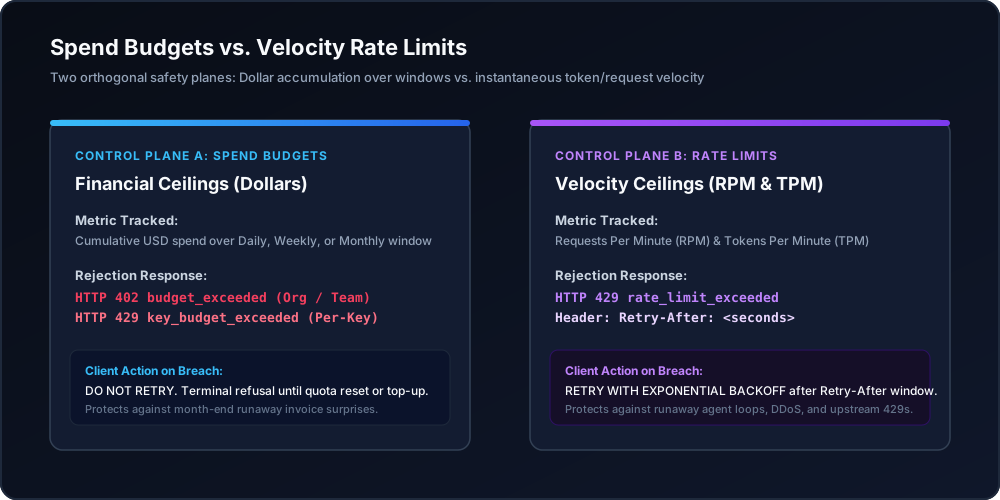
Figure 1: Architectural comparison between cumulative spend budgets and real-time RPM/TPM velocity controls.
When you need this
You just set a budget and want to know if you are done. You are not. A budget with a monthly duration will not notice a burst that finishes inside an hour, because a burst that finishes inside an hour spends less than a month's cap. If your risk is a loop, a retry storm, or a leaked key, the budget is the wrong first control.
You just set an RPM limit and want to know if you are done. Also no. A rate limit says nothing about price. Two hundred requests a minute to a small model and two hundred requests a minute to a flagship model are the same number of requests and wildly different bills. If your risk is the invoice, the rate limit is not the control that owns it.
Your client code retries everything with a 429. This is the failure that turns a bounded
problem into an unbounded one. A rate-limit 429 is transient and should be retried with backoff.
A budget 429 is a ceiling and will keep failing until somebody raises the cap. Retrying the second
forever burns your quota, your logs, and your patience, and it never succeeds.
What you need first
- An organization with credits. Signup is card-required with a $5 minimum purchase, the platform fee on top. Start at app.nrouter.ai/signup.
- Owner or organization admin permission. Setting a budget at organization, team, or user scope is restricted to organization owners and organization admins; key-level budgets can be set by the key's owner. The permission boundary is documented in Budget Controls.
- At least one virtual key you can throttle. Rate limits are set per key, so a workload sharing
a key with everything else cannot be limited independently. One key per
(environment, service)pair is the pattern — see API Key Management. - A measured burn rate. Open Reports → Advanced → Cost at
/advanced/cost, window30d, group by key. You need the median day and the worst day before you can set either ceiling honestly. - Somewhere for an alert to land. Create channels under Observability → Alerts → Channels (Email, Slack, Microsoft Teams, Jira, or a generic webhook) so a threshold crossing reaches a human before a cap reaches your traffic.
Step 1 — Classify the risk with one question
Ask: if this goes wrong, does it hurt because of how much it costs, or because of how fast it happens?
| The risk | Reach for | Why |
|---|---|---|
| Agent loop or retry storm | Rate limit | Caught in seconds; a monthly budget would not notice for days |
| Leaked key | Both | RPM bounds damage per minute, the budget bounds it in total |
| Expensive-but-steady feature | Budget | Not fast, just costly — no velocity signal to catch |
| Per-team or per-customer allowance | Budget | "This team gets $1,000/month" is a dollar question |
| One tenant starving the others | Rate limit | Throttle the greedy caller, protect shared capacity |
| Protecting the monthly invoice | Budget | Cumulative by definition |
| A batch job that must not exceed a fixed total | Budget, duration Total | A lifetime cap that never resets |
The split is not an nRouter invention. Anthropic's API documentation opens by naming exactly two kinds of ceiling — "Spend limits set a maximum monthly cost an organization can incur for API usage" and "Rate limits set the maximum number of API requests an organization can make over a defined period of time" (rate limits). Any platform that meters both money and throughput converges on the same two objects, because one question cannot answer the other.
The two failure modes are genuinely different shapes. A budget is a slow, cumulative ceiling measured in dollars over days or weeks. A rate limit is an instantaneous throttle measured in requests or tokens over one minute. Neither degrades gracefully into the other, which is why the right answer for anything that matters is both — the four independent ceilings a request passes are laid out in the four ceilings guide.
Step 2 — Set the rate limit on the key
Rate limits live on the key, and there are two of them.
RPM (requests per minute) caps the number of API calls. TPM (tokens per minute) caps the
tokens processed. Both use a sliding window, and both return 429 Too Many Requests with a
Retry-After header when exceeded. Higher plans carry higher defaults — Pay as you go gets the
standard tier, Pro is enhanced, Enterprise is a custom SLA — and a custom limit set on a specific
key overrides the plan default.
Both dimensions matter because velocity is not one number. OpenAI meters RPM, RPD, TPM, TPD, images per minute and audio minutes per minute independently, so the ceiling you hit is often not the one you were watching (rate limits). Azure goes further and derives one from the other: quota is assigned in tokens per minute and a request ceiling falls out of it at a published ratio — 10 RPM per 1,000 TPM for some model versions, 1 RPM per 1,000 TPM for others — which is why the same page warns you "might receive 429 (Too Many Requests) responses even when token usage metrics appear below your quota" (quotas and limits).
Neither shape is a spend control, and neither refills on a calendar. The replenishing behaviour you are actually reasoning about is the token bucket: capacity is topped back up continuously rather than reset in a step at the top of the minute, which is why a short burst can trip a limit your per-minute average never approaches.
Set them when you create or edit the key on the Keys page. The mental model for choosing a number: take your steady-state peak, add enough headroom that a normal traffic spike does not page anybody, and stop there. A rate limit set at ten times your peak protects nothing; a rate limit set at your median throttles your good days.
While you are on that screen, the same key carries three other scoping knobs that reduce blast
radius for free — Allowed models (an allowlist of model names), Allowed endpoints (restrict
a key to /chat/completions or /embeddings only), and an IP allowlist of CIDR blocks. The
allowlist is evaluated before the key is consumed against your budget, so denied requests cost zero
credits. The deeper treatment is in
RPM and TPM rate limiting per key, team, and org, and the
blast-radius reasoning is in
virtual keys vs the master key.
Step 3 — Set the budget at the scope that owns the money
Go to the Budgets page and click Create Budget. Four fields, then a mode.
| Field | What it does | Example |
|---|---|---|
| Budget Name | Appears verbatim in the rejection message — make it diagnostic | Data Science — Monthly |
| Max Spend | The hard dollar cap | $2,000.00 |
| Duration | Daily, Weekly, Monthly, or Total (never resets) | Monthly |
| Scope | Organization, Team, User, or API Key | Team |
Scope is the decision that matters most, because it determines both who is protected and which status code your client sees:
| Scope | Caps | Rejects with |
|---|---|---|
| Organization | Total spend across the whole account | 402 · budget_exceeded |
| Team | All keys belonging to a team | 402 · budget_exceeded |
| User | One member's spend inside the org | 402 · budget_exceeded |
| API Key | A single key — one service, one environment | 429 · key_budget_exceeded |
Then choose the enforcement mode: Block rejects at the cap, Warn alerts and keeps serving, Throttle alerts and flags the budget for rate reduction without hard-blocking. For a production backstop, choose Block. A budget in Warn mode is an observability feature, not a control — useful, but do not count it as a ceiling.
The distinction is worth dwelling on because most cost tooling only offers the Warn half. AWS Budgets, the closest cloud analogue, notifies on actual and forecasted spend and can optionally fire an action such as attaching a deny policy — but the underlying figures are "updated up to three times a day" (Managing your costs with AWS Budgets). A cadence measured in hours is fine for an EC2 fleet and useless against an agent loop that can spend a month's cap between two refreshes. A gateway budget is evaluated on the request, before the provider call, which is the only place a dollar ceiling can actually stop a dollar.
Add soft thresholds at 50%, 80% and 100% so the cap is never the first news, and bind them to the channel you created in the prerequisites. Alerts never block traffic; they are notification-only, which is exactly why the mode matters. The worked examples — a $50/month staging key, a $2,000/month team, a $100 total for a proof of concept — are in how to set hard spend limits.
Step 4 — Tell the three rejections apart in client code
This is where the two controls stop being an abstract distinction. Your client sees three different rejections, and only one of them is worth retrying.
import os
import time

import httpx

BASE_URL = "https://api.nrouter.ai/v1"
API_KEY = os.environ["NROUTER_API_KEY"]


def call_with_backoff(payload, max_attempts=5):
    delay = 1.0
    for attempt in range(max_attempts):
        r = httpx.post(
            f"{BASE_URL}/chat/completions",
            headers={"Authorization": f"Bearer {API_KEY}"},
            json=payload,
            timeout=60.0,
        )
        if r.status_code < 400:
            return r.json()

        body = r.json() if r.headers.get("content-type", "").startswith("application/json") else {}
        code = body.get("code") or body.get("error", {}).get("code")

        # 402 — a budget at org/team/user scope, or an exhausted balance.
        # Neither clears by waiting. Surface it; do not retry.
        if r.status_code == 402:
            raise RuntimeError(f"spend ceiling reached: {code} — {body}")

        # 429 with key_budget_exceeded is ALSO a ceiling, not a throttle.
        if r.status_code == 429 and code == "key_budget_exceeded":
            raise RuntimeError(f"per-key budget reached: {body}")

        # 429 rate_limit_exceeded is transient. Honor Retry-After, then back off.
        if r.status_code == 429:
            wait = float(r.headers.get("Retry-After", delay))
            time.sleep(wait)
            delay = min(delay * 2, 30.0)
            continue

        r.raise_for_status()

    raise RuntimeError("rate limited after retries")
The one line that pays for the whole function is the key_budget_exceeded branch. It is a 429,
and every naive retry loop treats a 429 as "wait and try again" — which, against a budget, means
hammering a wall until the calendar rolls over. The full client-side treatment, including
idempotency for partial work, is in
handling 429 and 402 errors.
Step 5 — Layer both for the case that needs it
The clearest argument for running both controls is a leaked key.
A rate limit alone bounds the per-minute damage but not the total: a key limited to 60 RPM, left unnoticed for a week, spends whatever 60 RPM buys for a week. A budget alone bounds the total but not the rate: a key with a $2,000 monthly cap can spend all $2,000 in the first twenty minutes, and you will find out from the rejection, not from the alert. Together they close both edges — bounded speed and bounded total — which is why key hygiene, per-key budgets, and per-key RPM/TPM are usually configured in one sitting rather than three.
export NROUTER_API_KEY="sk-nrouter-your-scoped-key"

# One key per (environment, service): its rate limit and its budget are its own.
curl -sS -D - -o /dev/null https://api.nrouter.ai/v1/chat/completions \
  -H "Authorization: Bearer $NROUTER_API_KEY" \
  -H "Content-Type: application/json" \
  -d '{
    "model": "gpt-5.4-mini",
    "messages": [{"role": "user", "content": "ping"}],
    "metadata": {"tags": ["team:platform", "env:staging"]}
  }' | grep -iE '^(x-nr-|retry-after|HTTP)'
Tags describe spend, they never authorize it — the team whose budget is charged comes from the authenticated key, not from anything in the body. That separation is the whole point of attributing spend by team, customer, and feature.
Verifying it worked
A control you have never watched fire is a control you are assuming. Prove each one on purpose, in a throwaway configuration, before you need it.
Prove the rate limit. Set a test key to a very low RPM, then send requests in a tight loop and
watch for the first 429. Confirm the response carries Retry-After and that the body's code is
rate_limit_exceeded — that code is what your client branches on, so seeing it once beats trusting
it forever.
Prove the budget. Create a budget scoped to that same test key with Max Spend $0.01,
Duration Total, Mode Block, then send one call. You should get 429 with
key_budget_exceeded. Repeat with an organization-scoped budget and you should get 402 with
budget_exceeded. Two scopes, two status codes, both observed rather than inferred.
Read the burn-down. The Budgets report at /advanced/budgets shows every budget's
utilization at org, team, key and user scope. Because scopes overlap, the headline number is peak
utilization — the single most-burned budget — rather than a sum that would double-count the same
dollars. Anything at or above 80% is flagged amber, over 100% red.
Expect a small gap between two numbers. Budget enforcement reads the credit ledger, which is authoritative; the spend charts read observability logs. Small differences between them are expected and are not a bug. If you want the mechanics of why the ledger is the one that governs, see reserve-and-settle and how to read your credit ledger.
What goes wrong
A budget set at the wrong scope. Symptom: the cap exists and spend sails past it. Usually the budget is bound to one key while the traffic runs on another, or it is scoped to a team the caller does not belong to. Fix: put the backstop at Organization scope so it covers keys created after you set it, then add narrower budgets underneath.
Warn mode mistaken for Block. Symptom: an alert fired at 100% and traffic kept flowing. That is Warn working correctly. Fix: change the mode on the budget; only Block rejects.
Retrying a budget rejection. Symptom: log volume explodes and nothing succeeds. Fix: branch on
the code, not the status. rate_limit_exceeded retries; key_budget_exceeded and
budget_exceeded do not.
Assuming a rate limit protects the invoice. Symptom: RPM has never been hit and the bill still doubled. Rate limits do not price anything. Fix: add a budget, and use cost vs usage to find the model whose unit cost moved.
Assuming a budget catches a burst. Symptom: an agent loop spent a fortune in twenty minutes and
the monthly budget never engaged, because twenty minutes of spend was still under a month's cap.
Fix: an RPM/TPM ceiling on the key that workload uses, plus a Daily budget as a second, shorter
window.
One key for everything. Symptom: throttling the batch job also throttles checkout. A shared key shares its rate limits, budget caps, and audit trail. Fix: one key per environment-and-service pair before you tune any number at all.
Try it
Budgets, rate limits, guardrails, evals, A/B tests and prompt management are on every plan — plans
change the monthly allowance and the guaranteed throughput, never the feature set. Pay as you go is
$0 subscription with a 4% platform fee charged on top of each credit purchase, as a flat 4% of the
credits, with no minimum fee — and every plan pays that same 4%. Subscriptions from $20/mo add a
monthly nrouter/auto allowance and higher rate limits, not a lower fee.
The table is at /pricing.
Load the $5 minimum — the platform fee rides on top — then create one key, one RPM limit, and one Block-mode budget. Watch each of them reject something on purpose before you trust either.
→ Start at app.nrouter.ai/signup, then open Keys, Budgets and Alerts in the dashboard.
Not sure which numbers fit your traffic? Bring your /advanced/cost export to the
nRouter community and we will help you pick the ceilings.
See also
- The Four Ceilings Every LLM Request Passes — where budgets and rate limits sit relative to the credit balance and guardrails, and why they are independent.
- How to Set Hard Spend Limits on Your LLM Gateway — the budget half in depth, with worked caps for staging keys, teams, and proofs of concept.
- RPM and TPM Rate Limiting Per Key, Team, and Org — the rate-limit half in depth, including why a client cannot lift its own throttle.
- Handling 429 and 402 Errors From an LLM Gateway — the full client-side decision tree, including idempotency for partial work.
- Auto Top-Up Without Surprise Bills — why enabling auto top-up makes the Block-mode budget in Step 3 mandatory rather than optional.
- Virtual Keys vs Master Key: Scoping a Key Per Job — how to slice keys so a limit can be applied to one workload without touching the others.
- Pricing — plan table, platform fee, and how throughput tiers differ.
Sources
Verified 2026-08-23. Corrections to hello@nrouter.ai. Every number, field name and status code attributed to nRouter comes from our own documentation and pricing page; every claim about how other platforms model the same two controls is cited to that platform's docs.
How other platforms draw the same line
- "Spend limits" and "rate limits" as two separate objects: Anthropic — Rate limits
- RPM, RPD, TPM, TPD and image/audio dimensions metered independently: OpenAI — Rate limits
- TPM-allocated quota, the derived RPM ratio, and 429s below the token metric: Azure OpenAI in Microsoft Foundry — Quotas and limits
- Continuous replenishment rather than a per-minute reset: Token bucket
- A cost budget that notifies on a multi-hour refresh cadence: Managing your costs with AWS Budgets
nRouter
- Budget fields, durations, scopes, enforcement modes and status codes: Budget Controls
- RPM/TPM behaviour, the sliding window and
Retry-After: Budget Controls - Per-key scoping — allowed models, allowed endpoints, IP allowlist: API Key Management
- Error status codes returned by the API: Chat Completions API
- Budget burn-down, peak utilization and the ledger-vs-logs note: Analytics & Reports
- Alert channels and delivery: Alerts & Notifications
- Plans, platform fee and minimum purchase: nrouter.ai/pricing