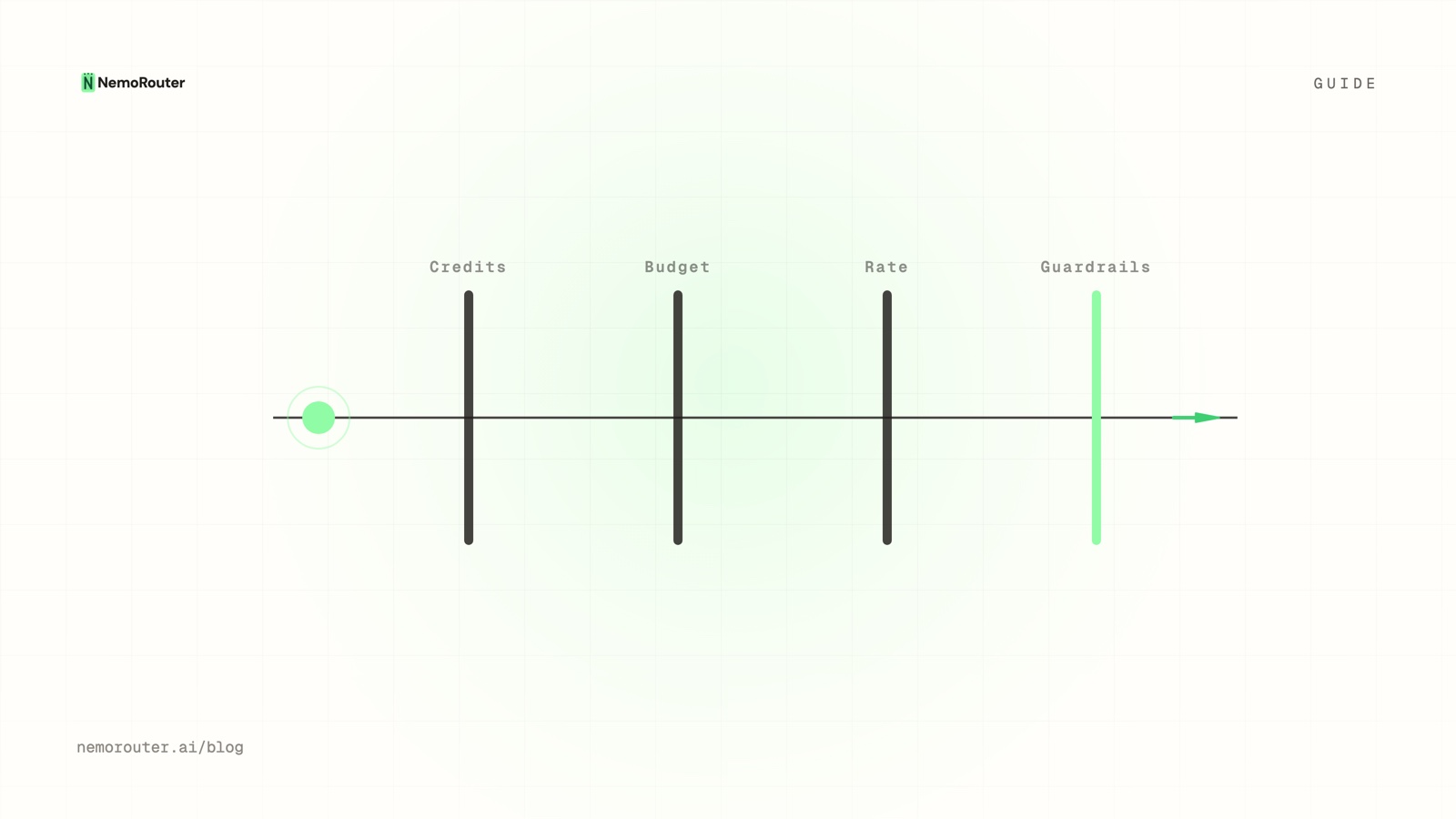
The short answer: a request clears four independent gates before it leaves the gateway. Credits ask "is there money?" (
402). Budgets ask "has this scope spent its allowance?" (402at org/team/user scope,429at key scope). Rate limits ask "too fast?" (429). Guardrails ask "is the content allowed?" (400). Passing one says nothing about the other three.
The short answer
Most teams collapse all of this into one idea called "spend control" and then get surprised twice: once when a request is blocked while the account is clearly funded, and once when a runaway loop drains a balance that had a budget on it. Both surprises come from the same mistake — treating four unrelated questions as one setting.
They are not one setting. They are four checks, run before the request is forwarded to any provider, and each one can reject a call on its own. This guide walks each gate in the order the gateway asks the question, shows the exact response you get back, points at the dashboard page where you configure it, and ends with a procedure for proving each gate actually bites on your own account rather than assuming it does.
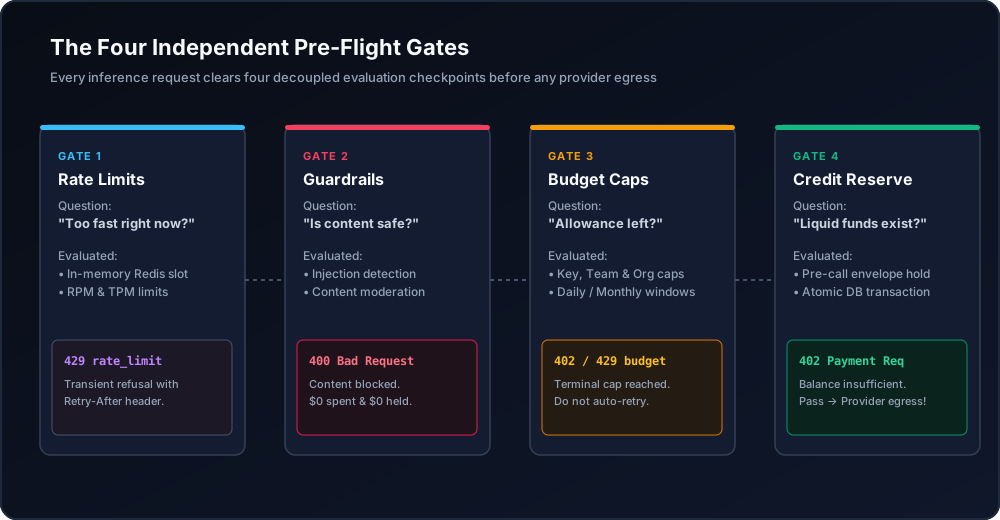
Figure 1: The four independent pre-flight gates evaluated sequentially before any provider egress.
When you need this
Three symptoms bring people here, and all three are the same confusion wearing different clothes.
The first is "we have credits but calls are failing." Somebody funded the organization, watched the balance sit comfortably in five figures, and still sees requests rejected. The balance was never the binding constraint — a team or key budget was, and it fired at a different scope with a different code.
The second is "we set a monthly budget and still burned a week of spend in an afternoon." A monthly dollar cap is a total, not a rate. A retry loop that fires two thousand times in ten minutes stays comfortably inside a $5,000 monthly cap right up until it doesn't, and by then the money is gone. Velocity is a separate control.
The third is "the request was affordable and it still got blocked." That is a guardrail, and it is the one gate that has nothing to do with money at all. Cost says nothing about safety, so the check that decides whether content may leave your infrastructure is deliberately independent of the checks that decide whether you can afford to send it.
If you have hit any of those, the fix is not to loosen one number. The fix is to know which gate fired.
What you need first
You can read this guide with nothing, but you cannot follow the steps without four things in place:
- An organization with a funded credit balance. Signup is card-required and takes a real charge; the minimum credit purchase is $5. See Pricing for the platform fee that rides on top.
- At least one virtual key. Create it on the Keys page
(
/[organization]/keys); the fullsk-nrouter-…value is shown exactly once at creation. The mechanics are in API Key Management, and the blast-radius reasoning is in Virtual keys vs master key. - Owner or admin role, if you want to set budgets at organization, team, or user scope. Key-level budgets can be set by the key's owner. Roles are explained in Team Management.
NROUTER_API_KEYexported in your shell, because every code block below is runnable as written againsthttps://api.nrouter.ai/v1.
export NROUTER_API_KEY="sk-nrouter-..."   # shown once, at key creation
curl -sS https://api.nrouter.ai/v1/models \
  -H "Authorization: Bearer $NROUTER_API_KEY" | head -c 400
If that returns a model list, you are ready. If it returns 401, the key is
wrong or revoked — check Authentication.
Gate 1 — Credit balance: is there money at all?
Credits are the fuel, and this is the only gate that is about the account rather
than a policy you wrote. Before the request goes anywhere, the gateway reserves
the call's estimated cost against the organization's balance. If the balance
cannot cover the reservation, the call comes back 402 Payment Required and no
provider is contacted.
The reserve happens before the provider call and is settled against the real cost afterwards, which is what stops a burst of concurrent requests from each seeing the same stale balance and collectively overspending it. The mechanism is described in Reserve-and-settle.
# A 402 from an unfunded org — no provider was called, nothing was charged.
curl -i -sS https://api.nrouter.ai/v1/chat/completions \
  -H "Authorization: Bearer $NROUTER_API_KEY" \
  -H "Content-Type: application/json" \
  -d '{"model":"gpt-5.4-mini","messages":[{"role":"user","content":"hi"}]}'
# HTTP/2 402
# x-nr-request-id: req_...
The estimate the reserve is taken against is not a guess: it is the model's published per-token rate, which every provider prints. Amazon lists on-demand input and output prices per 1,000 tokens for each Bedrock model (Bedrock pricing), and Google does the same per model on Vertex AI (generative AI pricing). A gateway that reserves against those numbers can refuse a call it cannot afford before the provider is contacted; one that only reads usage from the response can only ever tell you afterwards.
A balance can never go negative, so this gate is the hard floor under everything
else. The fix is to top up on the Billing page (/[organization]/billing),
or to configure auto-topup so the floor is never reached in the first place —
the trade-offs are in
Auto Top-Up Without Surprise Bills: Threshold, Amount, Cap.
Gate 2 — Budget caps: has this scope spent its allowance?
A budget is a spend allowance attached to a scope and a window. It is the gate people most often assume is the credit balance, and it is not: you can have $40,000 in credits and still be blocked because the key you are calling with has a $50/day cap and it is 3pm.
Create one on the Budgets page (/[organization]/budgets) → Create
Budget. Three fields decide the behaviour:
| Field | What it does | Example |
|---|---|---|
| Budget Name | The label that appears in the error message | Backend API — Monthly |
| Max Spend | The hard cap in USD | $500.00 |
| Duration | Daily, Weekly, Monthly, or Total (never resets) | Monthly |
Then assign it to a scope — organization, team, user, or a single API key. The status code you get back depends on that scope, and this is the single most misread detail in the whole system:
- Organization, team, and user budgets return
402with codebudget_exceeded. - Per-key budgets return
429with codekey_budget_exceeded.
{
  "error": "Team budget 'Data Science — Monthly' (monthly) exceeded: $2000.12 used of $2000.00 limit.",
  "code": "budget_exceeded",
  "request_id": "req_..."
}
The message names the budget, the window, the amount used, and the limit — which means the error itself tells you which of possibly several overlapping caps fired. The alert-versus-cap split is standard practice rather than a local convention: OpenAI's own production guidance tells you to "set spend alerts … to send notifications when usage exceeds a certain dollar amount" and then adds, separately, that "to enforce a monthly cap, set a hard spend limit" (production best practices). Two different objects, and only the second one stops anything. Each budget also picks an enforcement mode: Block rejects at the cap, Warn alerts and keeps serving, and Throttle alerts and flags the budget for rate reduction without a hard cut-off. Full field reference in Budget Controls; the strategy for choosing caps is in How to set hard spend limits.
Gate 3 — Rate limits: is this too fast?
Budgets cap total dollars over a window. Rate limits cap velocity — requests per minute (RPM) and tokens per minute (TPM). They are the gate that catches the failure mode a dollar cap structurally cannot: a runaway retry loop that would happily consume a whole month's budget inside an afternoon while never once exceeding it.
A rate limit is a sliding window, and exceeding it returns 429 with a
Retry-After header telling you exactly how long to wait:
{
  "error": {
    "message": "Rate limit exceeded. Retry after 12 seconds.",
    "type": "rate_limit_error",
    "code": "rate_limit_exceeded"
  }
}
Set RPM and TPM per key when you create or edit it. Plan tier sets the defaults — Pay as you go gets standard limits, Pro gets enhanced ones, Enterprise gets custom SLAs — and a limit set explicitly on a key overrides the plan default.
This gate is also the one with an explicit security mandate behind it. OWASP's Top 10 for LLM Applications lists LLM04: Model Denial of Service — "overloading LLMs with resource-heavy operations can cause service disruptions and increased costs" (OWASP Top 10 for LLM Applications). The cost half of that sentence is what makes velocity a money control as well as an availability one.
The important design property: a rate limit is not overridable per request. It is a boundary, not a knob the caller can turn, which is what makes it useful against a leaked key. A key throttled at a fixed RPM does bounded damage no matter how much budget sits behind it. The per-scope mechanics are in RPM and TPM rate limiting, and the "which control do I reach for" question has its own post at Budgets vs rate limits.
Gate 4 — Guardrails: is the content allowed?
The first three gates are about quantity. This one is about content, and it is the only gate that can reject a request that is affordable, in budget, and well under every velocity limit.
Guardrails run pre-call (before the request reaches a model) and post-call (on the response, before your user sees it). Five types ship: Presidio PII detection and anonymisation, regex pattern filters, keyword blocklists, prompt-injection detection, and a custom type that calls your own webhook to decide. Each takes one of four actions: Block, Redact, Warn, or Log.
Prompt-injection detection is not an optional extra in that list either — it is LLM01, the first entry, described as "manipulating LLMs via crafted inputs [that] can lead to unauthorized access, data breaches, and compromised decision-making". A content gate is the only one of the four that addresses it.
A blocked request returns 400 with guardrail_blocked. Because the block
happens before egress, it costs zero credits and never reaches the provider's
logs — which is the entire point of running the check at the gateway instead of
inside your application.
One correction worth internalising, and this post had it backwards until 2026-08-29: guardrail scopes resolve by specificity, not union. For each guardrail the assignment at the narrowest scope that mentions it decides, in the order key > team > org > org default, and that row alone — a key-level rule overrides its team's and org's rather than adding to them. Guardrails no assignment mentions are unaffected, so one request can have different guardrails decided at different scopes. Configure them on the Guardrails page, test a rule against sample input on its Test tab before it touches live traffic, and roll back a bad tightening from the Versions tab. Reference: Guardrails; the argument for shipping them on every plan is in Guardrails on every request.
Reading the status code back to the gate that fired
This is the table to bookmark. Two gates return 402 and two return 429, so
the status code alone is never enough — you need the code field.
| Gate | Scope | Status | code |
|---|---|---|---|
| Credit balance | Organization | 402 | insufficient balance |
| Budget cap | Org / team / user | 402 | budget_exceeded |
| Budget cap | Single API key | 429 | key_budget_exceeded |
| Rate limit | Key (RPM / TPM) | 429 | rate_limit_exceeded |
| Guardrail | Narrowest of key / team / org decides | 400 | guardrail_blocked |
Providers face the same ambiguity and solve it the same way: Anthropic's error reference documents
its HTTP statuses alongside a typed error.type, and it uses rate_limit_error for both a genuine
throttle and a monthly spend cap, distinguishing them only by a nested error_code
(errors). The number is never the whole answer anywhere.
The practical consequence is that client retry logic must branch on code, not
on the status. A 429 from rate_limit_exceeded clears on its own in seconds and
should be retried with backoff. A 429 from key_budget_exceeded will return
429 again on every call until the window resets or a human raises the cap, and
retrying it is a tight, pointless loop. The full client-side playbook is
Handling 429 and 402 errors.
Verifying it worked
Configuration you have never seen fire is a hypothesis, not a control. Prove each gate on a throwaway key before you rely on any of them in production.
- Create a disposable key on
/[organization]/keys— name itgate-testso you can revoke it without thinking. - Prove the rate limit. Set the key's RPM to a deliberately tiny number,
then fire more calls than that in one minute and confirm you get
429withrate_limit_exceededand aRetry-Afterheader:
for i in $(seq 1 12); do
  curl -s -o /dev/null -w "%{http_code}\n" \
    https://api.nrouter.ai/v1/chat/completions \
    -H "Authorization: Bearer $NROUTER_API_KEY" \
    -H "Content-Type: application/json" \
    -d '{"model":"gpt-5.4-mini","messages":[{"role":"user","content":"ping"}]}'
done- Prove the key budget. Attach a
$0.01Total budget to the same key, send two calls, and confirm the second returns429withkey_budget_exceededand a message naming the budget. - Prove a guardrail. Add a keyword guardrail in Block mode from the
Templates gallery, send a request containing the keyword, and confirm
400withguardrail_blocked— then confirm on/[organization]/logsthat no cost was recorded for it. - Confirm the successful path still works. Send one ordinary call and read
x-nr-request-costoff the response. It carries the settled cost in USD; it is absent when a call could not be priced, which is not the same as zero and must never be read as zero.
curl -sS -D - -o /dev/null https://api.nrouter.ai/v1/chat/completions \
  -H "Authorization: Bearer $NROUTER_API_KEY" \
  -H "Content-Type: application/json" \
  -d '{"model":"gpt-5.4-mini","messages":[{"role":"user","content":"ping"}]}' \
  | grep -i '^x-nr-'
Then revoke gate-test. You now have four gates you have personally watched
reject a request, which is a materially different claim from four gates you
configured.
What goes wrong
You set the budget at the wrong scope. An organization budget is a backstop on the whole account; it will not stop one team from consuming the entire thing. If the concern is "team A should not spend team B's money", the budget belongs at team scope, and the org budget stays above it as the ceiling of last resort. Scope design is covered in Org, team, member.
You retried a budget block. A 429 carrying key_budget_exceeded is a
policy outcome, not a transient failure. Backoff logic that treats every 429
identically will spin against it until the window resets, adding latency and
achieving nothing.
You used Warn mode and called it a cap. Warn alerts and keeps serving. It is the right mode while a team negotiates its allowance and the wrong mode as a runaway-spend backstop. Production caps should be Block, with a soft threshold below them for early warning — wire the destinations under Observability → Alerts → Channels, described in Alerts & Notifications.
You expected a monthly budget to stop a burst. It cannot, by construction. Pair every dollar cap with an RPM and TPM limit on the same key; the budget bounds the month, the rate limit bounds the minute.
You read a missing cost header as a free request. When a call cannot be
priced, x-nr-request-cost is absent from the response. Client code that
defaults an absent header to 0.0 will quietly under-report spend in your own
dashboards while the ledger stays correct. Treat absent as unknown and reconcile
against the ledger — see
How to read your LLM credit ledger.
Try it
Every gate described here is available to every nRouter customer on every plan.
Guardrails, per-team budgets, rate limits, A/B tests, prompt management and evals
are not upgrade paths — every plan pays the same 4% platform fee on credits, charged
on top; plans vary the monthly nrouter/auto allowance (subscriptions from $20/mo)
and the default rate limits, never the feature set.
Load the $5 minimum — the platform fee rides on top — then create a key, attach a $1 daily budget to it, and watch the gate fire. Start at app.nrouter.ai/signup, or send a first call from the browser in the Playground before you write any code.
Questions about which control fits your failure mode? Ask in the nRouter community.
See also
- How to set hard spend limits on your LLM gateway — the strategy layer above this post: which caps to set, at which scope, and what to do when one fires.
- Budgets vs Rate Limits: Pick the Control, Then Set Both — a decision guide for gate 2 versus gate 3 when both would technically work.
- Handling 429 and 402 errors from an LLM gateway — the client-side half: how to branch on
codeso a budget block is never retried like a throttle. - Reserve-and-settle: never overspend a credit balance — why gate 1 holds under concurrency instead of letting parallel calls race the same balance.
- Inline LLM Guardrails: Redact, Block, or Flag Every Request — the content gate in depth, including pre-call versus post-call placement.
- Org, team, member: scoping keys, budgets, guardrails — how scope is resolved, which is what decides whether your budget fires as
402or429. - Pricing — the platform fee and plan-level rate-limit defaults referenced throughout.
Sources
Verified 2026-06-14. Every number and status code attributed to nRouter comes from our own documentation or pricing page; the external references below are cited for the specific claim each one supports. If something has drifted, email hello@nrouter.ai and we will correct it.
External
- Published per-token rate cards, which is what gate 1 reserves against: Amazon Bedrock pricing · Vertex AI generative AI pricing
- A spend alert and a hard spend limit as two separate settings (gate 2): OpenAI — Production best practices
- LLM01 Prompt Injection (gate 4) and LLM04 Model Denial of Service — "increased costs" (gate 3): OWASP Top 10 for LLM Applications
- One HTTP status covering two different conditions, separated by a typed error field: Anthropic — Errors
nRouter
- Budget scopes, codes, durations and enforcement modes: Budget Controls
- Guardrail types, actions and specificity-based scope resolution: Guardrails
- Error responses and nRouter response headers: Chat Completions API
- Key creation, RPM/TPM fields and rotation: API Key Management
- Plans, platform fee and credit minimum: nrouter.ai/pricing