The short answer: set auto top-up on the Billing page with two fields — a threshold (top up when the balance drops below this) and a top-up amount (which must be at least the threshold) — and then create an organization budget in Block mode on the Budgets page. The threshold keeps you liquid, the amount keeps the charges infrequent, and the budget is the only thing that can actually stop the refills.
Auto top-up solves a real problem. A credit balance that reaches zero mid-traffic starts returning
402 Payment Required on every call, and your product degrades until a human with billing
permission notices and buys credits. Auto top-up removes the human from that loop. But the naive
version of it — "refill whenever low, no other limit" — quietly recreates the exact failure that
hard spend limits exist to prevent: an automated loop
that can spend without bound, at machine speed, over a weekend, while nobody is watching.
The fix is not to avoid auto top-up. The fix is to understand that running out of money is, perversely, a safety feature — it is the circuit breaker that halts a runaway — and that once you automate it away you owe yourself an explicit replacement. That replacement is a budget. This guide walks through all five settings in the order you should apply them, with the real dashboard fields and the observable signal that proves each one is live.
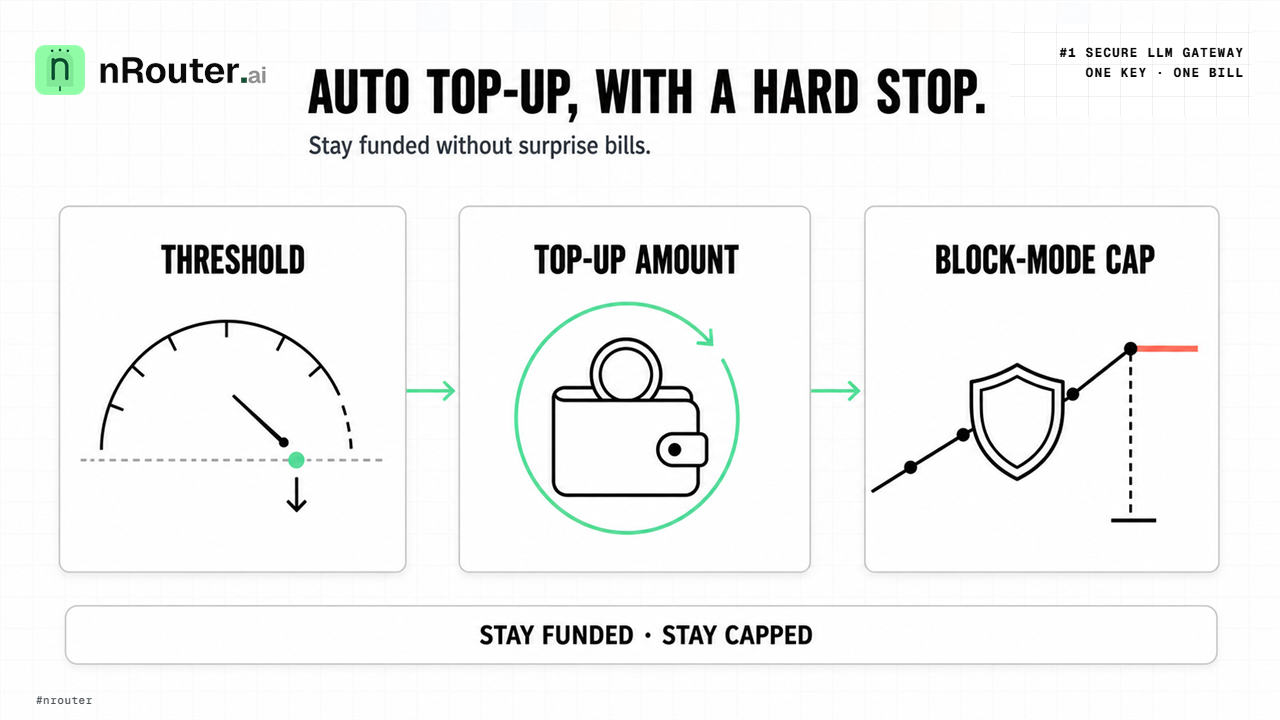
Figure 1: Safe auto top-up architecture combining threshold replenishment with hard organization spend caps.
When you need this
Three symptoms bring people to this page, and they are worth naming because they lead to different starting values.
The first is the 402 at 2am. Your traffic is healthy and growing, your balance was fine on Friday, and by Sunday afternoon every request is failing with a payment error. Nothing is broken; you simply spent the balance and there was no mechanism to extend it. This is the classic case for auto top-up, and the one where you can safely be generous with the top-up amount.
The second is the manual top-up treadmill. Somebody on your team buys credits two or three times a week, always reactively, always after a Slack message. Each purchase is a real card charge that lands in your invoice history, and the reconciliation cost of forty small charges a quarter is worse than the cost of the credits. Here the fix is mostly the amount field: refill less often, in larger increments.
The third is the incident you already had. An agent loop, a retry storm, or a runaway test job burned through a balance far faster than your product could have. If that has happened once, do not enable auto top-up until the budget in Step 3 exists — otherwise you are wiring a refill pump to a leak. If you want the mechanics of why a retry is a second bill, the reserve-and-settle model explains what happens to the money on each attempt.
What you need first
Auto top-up touches money, so the prerequisites are permission prerequisites as much as technical ones.
- An organization with a funded balance. Signup is card-required and takes a real charge; the minimum credit purchase is $5, with the platform fee on top. Start at app.nrouter.ai/signup if you do not have an org yet.
- Owner or admin permission. Only owners can buy credits, change plans, and manage payment methods; owners and admins can change auto top-up and view invoices and the ledger. Members and viewers do not see Billing in their sidebar at all — their cost visibility lives under Reports → Advanced. The full permission matrix is in the Billing & Credits docs.
- A saved payment method. Auto top-up cannot fire without one. Add it through Manage Payment Methods on the Billing page, which opens the Stripe Customer Portal in a new tab. Card details never touch nRouter.
- A working virtual key. You need one to measure burn in Step 1 and to prove the ceiling in
the verification step. Create it on the Keys page — the full
sk-nrouter-…value is shown exactly once, at creation. Key hygiene is covered in virtual keys vs the master key. - Thirty days of spend history, or the willingness to run for a week before setting final numbers. Every value below is derived from your burn rate, and a guessed burn rate produces a guessed ceiling.
Step 1 — Measure your real daily burn
Do not start from the fields. Start from the number the fields are supposed to be derived from.
Open Reports → Advanced → Cost at /advanced/cost, set the time window to 30d, group by
model, and export the breakdown to CSV. What you want is the median daily spend and the worst
single day in the window — those two numbers set the threshold and the cap respectively. A team
whose median day is $18 and whose worst day is $47 has a very different risk profile from a team
whose median is $18 and whose worst day is $310.
If you have no history yet, generate some and read the cost off the response directly. Every call returns its own price on a header:
export NROUTER_API_KEY="sk-nrouter-your-key-here"

curl -sS -D - -o /dev/null https://api.nrouter.ai/v1/chat/completions \
  -H "Authorization: Bearer $NROUTER_API_KEY" \
  -H "Content-Type: application/json" \
  -d '{
    "model": "gpt-5.4-mini",
    "messages": [{"role": "user", "content": "Summarize the CAP theorem in two sentences."}]
  }' | grep -i '^x-nr-'
You will see x-nr-request-id, x-nr-request-cost, x-nr-cost-status, x-nr-model and the
token counts. Multiply the per-call cost by your real call volume and you have a burn rate that
is measured rather than assumed. One caveat worth knowing before you build a spreadsheet on it: when
a model's price is unknown, the cost is reported as unpriced and the header is absent — it
is never a zero. Treat a missing header as "look it up", not as "that call was free."
If you prefer to sanity-check the header against a rate card rather than trust it blind, the
published per-token prices are the place to do it — OpenAI lists gpt-5.4-mini at $0.15 per 1M input
tokens and $0.60 per 1M output on its pricing page.
Multiply your token counts, compare to the header, and you have calibrated the number you are about
to build a threshold on.
For the worked example through the rest of this guide, assume a measured $18/day median and a $47 worst day.
Step 2 — Set the threshold and the top-up amount
Go to Billing (/billing) and enable auto top-up. There are exactly two fields.
Threshold — the balance level that triggers a refill. Set it to roughly one day of median burn, so a refill lands well before zero even if the charge takes a few minutes to clear and even if today is busier than usual. For our example: $25.
Top-up amount — how much is purchased when the threshold is crossed. Set it to seven to ten days of median burn, so refills are infrequent and each one is a single reconcilable invoice line. For our example: $150. The form enforces one rule you should know before you hit save: the amount must be at least the threshold. A $10 amount against a $25 threshold is rejected, and rightly so — it would refill into a balance that is still below the trigger and fire again immediately.
What actually happens at the threshold is a real card charge, off-session, against the payment method you saved at signup — and the credit lands only after that charge succeeds. Stripe models those as two different objects, and the distinction is worth holding: a Setup Intent exists "to collect and save payment method details for future use without creating a charge", while a Payment Intent is what you use "to immediately charge a customer and collect payment" (how Payment Intents and Setup Intents work). Auto top-up is the second one, fired on your behalf, which is why a card that has quietly expired since signup breaks the refill and not the signup.
The two numbers together define your refill cadence. At $18/day, a $150 top-up buys about eight days, which means roughly four card charges a month. That is the number to sanity-check: if your arithmetic predicts twenty charges a month, your amount is too small.
Auto top-up deletes a circuit breaker — you must replace it
Running out of credits is the one limit that stops a runaway without anyone configuring anything. Auto top-up removes it by design. Everything below Step 3 exists to put an explicit stop back in its place, and auto top-up enabled without that stop is an uncapped spend loop wearing a convenience label.
Step 3 — Add the organization budget that top-up cannot cross
This is the step people skip, and it is the one that makes the rest safe.
It is also what a provider's own spend cap does for you when you do not refill. Anthropic pauses API usage entirely once an organization reaches its monthly cap — "usage pauses until 00:00 UTC on the first day of the next month, unless you request a higher limit sooner" (rate limits). That hard stop is the safety property auto top-up removes. Step 3 is you putting an equivalent one back, under your own control and at a number you chose.
Go to the Budgets page and click Create Budget. Fill in four things:
| Field | Value for the worked example | Why |
|---|---|---|
| Budget Name | Org backstop — monthly | The name appears in the error message; make it diagnostic |
| Max Spend | $900.00 | ≈ $18/day × 30 days, plus ~65% headroom for real growth |
| Duration | Monthly | Resets on the 1st at midnight UTC |
| Scope | Organization | The backstop over everything, including keys created later |
Then choose the enforcement mode. There are three, and only one of them stops anything:
| Mode | At the cap | Use it for |
|---|---|---|
| Block | Requests are rejected | The production backstop — this is the one you want here |
| Warn | An alert fires, traffic continues | Visibility while a team sorts out headroom |
| Throttle | An alert fires and the budget is flagged for rate reduction | High-traffic keys you do not want to cut off entirely |
Pick Block. A budget in Warn mode paired with auto top-up is functionally the same as having no budget at all — it narrates the runaway instead of ending it.
The status code at the cap depends on the scope, and this matters for the client code that has to
react to it: an organization, team, or user budget returns 402 with code budget_exceeded,
while a per-key budget returns 429 with code key_budget_exceeded. The full error taxonomy is
in handling 429 and 402, and the reason there are four
independent ceilings rather than one is laid out in
the four ceilings every request passes.
Step 4 — Wire the early warning so the cap is never the first news
A cap that fires without warning is an outage you scheduled for yourself. Budgets support soft thresholds — configure them at 50%, 80% and 100% of the limit and each crossing dispatches a notification while you can still act.
By default, budget alerts are emailed to your organization's owners and admins with no extra setup beyond having a budget in place. To route them somewhere a team actually watches, create the destination first under Observability → Alerts → Channels (Email, Slack, Microsoft Teams, Jira, or a generic webhook), then bind that channel to the threshold on the Budgets page.
While you are on the Alerts page (/alerts), turn on Daily Reports as well. It is a single
toggle that emails a daily spend-and-usage digest to owners and admins, and it is the cheapest
possible early-warning system for a spend curve that is bending the wrong way. The full alert
catalog — LLM Exceptions, LLM Too Slow, Hanging Requests, Outage Alerts — is documented in
Alerts & Notifications. None of them block traffic; they are notification-only
by design, which is precisely why the Block-mode budget in Step 3 is not optional.
Step 5 — Give the risky workload its own key and its own smaller cap
The org budget is a backstop, not a scalpel. If one workload is responsible for most of your variance — a coding agent, a batch summarizer, a nightly evaluation job — give it a dedicated virtual key with its own per-key budget well below the org ceiling. That way the workload most likely to run away hits a wall long before it can consume the whole organization's month.
On the Keys page, create a key per (environment, service) pair and attach a per-key budget and
per-key RPM/TPM limits when you create it. Naming matters more than it looks: the dashboard sorts
alphabetically, so prod-checkout-service and stage-batch-summarizer group themselves.
# The batch job runs on its own key, so its ceiling is its own.
export NROUTER_API_KEY="sk-nrouter-your-batch-key"

curl -sS https://api.nrouter.ai/v1/chat/completions \
  -H "Authorization: Bearer $NROUTER_API_KEY" \
  -H "Content-Type: application/json" \
  -d '{
    "model": "gpt-5.4-mini",
    "messages": [{"role": "user", "content": "Summarize this ticket."}],
    "metadata": {"tags": ["team:platform", "feature:batch-summarizer", "env:prod"]}
  }'
The tags do not authorize anything — authorization comes from the authenticated key — but they make the spend queryable afterward, which is how you find out which workload moved the number. That pattern is covered end to end in attributing LLM spend by team, customer, and feature, and the per-key throughput half is in RPM and TPM rate limiting.
Verifying it worked
Four observable signals, in increasing order of how much they prove.
One — the balance card reflects the refill. On /billing, the balance card shows available
credits (balance minus in-flight reservations), lifetime purchased, credits used including fees,
and currently reserved. After a top-up fires, lifetime purchased moves by exactly the top-up amount.
Watch available, not balance — they differ by whatever is reserved right now.
Two — the invoice row exists. The invoice table on the same page lists every charge with its number, date, amount and status. An auto top-up that fired appears there as a Paid row. If your balance moved and no invoice appeared, you are looking at a manual purchase somebody else made.
Three — the ledger and the balance agree. Every credit movement is ledgered, and the sum of the ledger is the balance. Reading it is a skill worth having before you need it in an argument with finance — see how to read your credit ledger.
Four — the cap actually blocks. This is the only one that proves the safety property, so do it deliberately. Create a throwaway budget scoped to a single test key with Max Spend $0.01, Duration Total, Mode Block, then send one request with that key:
export NROUTER_API_KEY="sk-nrouter-your-test-key"

curl -sS -i https://api.nrouter.ai/v1/chat/completions \
  -H "Authorization: Bearer $NROUTER_API_KEY" \
  -H "Content-Type: application/json" \
  -d '{
    "model": "gpt-5.4-mini",
    "messages": [{"role": "user", "content": "ping"}]
  }'
A per-key budget returns 429 with code key_budget_exceeded; repeat the same test with an
org-scoped budget and you get 402 with budget_exceeded. Delete the throwaway budget afterward.
A ceiling you have never seen fire is a ceiling you are assuming, not one you have verified — and
the whole point of this guide is that auto top-up makes assumptions expensive.
What goes wrong
Auto top-up enabled, no budget created. The single most common failure, and the reason this guide exists. Symptom: spend for the month is a multiple of anything you expected, and the invoice history shows a run of identical charges hours apart. Fix: Step 3, in Block mode, at organization scope. Nothing else in this list matters until that budget exists.
The top-up amount is below the threshold. Symptom: the form refuses to save. Fix: raise the amount. The rule is deliberate — an amount smaller than the trigger would refill into a still-below-threshold balance and immediately re-fire.
The saved card declines. Symptom: a failure banner appears on the Billing page with an Update Payment action, and the balance stops moving. Auto top-up cannot succeed without a working payment method, and it will not credit anything before payment confirms. Fix: update the card through the Stripe Customer Portal via Manage Payment Methods. Expect the reason to be vague: issuers deliberately return limited detail, which is why Stripe documents decline codes and decline-rate reduction as a topic of its own (declines). The practical consequence is that "why did it fail" is usually a question for the cardholder's bank, not for us — so treat a decline as a page-a-human event, not a retry-and-hope one.
The threshold is tight and the amount is small. Symptom: a stream of small charges, and a reconciliation headache at month end. Not dangerous, just noisy. Fix: raise the amount toward seven to ten days of burn. Frequent refills are also a genuine early-warning signal — if the cadence suddenly doubles at a constant configuration, your spend doubled, and cost vs usage will tell you whether it was volume or model mix.
Treating the credit balance as the budget. Symptom: someone says "we're capped, we only keep $200 of credits." Once auto top-up is on, that sentence is false — the balance is no longer a ceiling, it is a buffer that refills itself. The budget is the ceiling. This confusion is exactly what budgets vs rate limits untangles, and it is worth reading before the incident rather than during it.
Only owners can fix it, and no owner is on call. Symptom: a 402 at 2am and the person with billing permission is asleep. Fix: make sure at least two people hold owner or admin, and that budget alerts route to a channel a rota watches, not to one person's inbox.
Try it
Auto top-up and budgets are on every plan — plans change the monthly allowance and the guaranteed
throughput, never the feature set. Pay as you go is $0 subscription with a 4% platform
fee added on top of each top-up — a flat 4% of the credits, so a $150 refill is charged $156.00 —
and every plan pays that same 4% on its top-ups, with no minimum fee. Subscriptions from
$20/mo add a monthly nrouter/auto allowance and higher rate limits, not a lower fee; the
numbers live on /pricing.
Load the $5 minimum — the platform fee rides on top — then set the threshold, the amount, and the Block-mode budget in the same sitting. It takes about ten minutes and it is the cheapest insurance in your stack.
→ Start at app.nrouter.ai/signup, then open Billing and Budgets in the dashboard.
Questions about which numbers fit your burn? Ask in the nRouter community, or read the canonical specification in Billing & Credits and Budget Controls — this guide is the narrative, the docs are the contract, and they agree.
See also
- How to Set Hard Spend Limits on Your LLM Gateway — the budget half of this guide in full, including how to choose a duration and a scope.
- The Four Ceilings Every LLM Request Passes — why balance, budget, rate limit and guardrail are independent, and what passing one does not tell you.
- Handling 429 and 402 Errors From an LLM Gateway — the client-side code for the exact status codes your new cap will start returning.
- How to Read Your LLM Credit Ledger — how to confirm that a top-up landed and that the ledger and balance agree.
- Budgets vs Rate Limits: Pick the Control, Then Set Both — the decision guide for which of the two controls owns which risk.
- Markup-Free LLM Credits: The Fee Is On Top, Never In The Rate — why a $150 top-up credits $150, with the platform fee charged separately on top.
- Pricing — the canonical plan table, platform fee, and the $5 minimum purchase.
Sources
Verified 2026-08-23. Corrections to hello@nrouter.ai.
-
nRouter pricing, plans and platform fee: nrouter.ai/pricing
-
Billing, auto top-up fields and permissions: Billing & Credits
-
Budget fields, durations, scopes, enforcement modes and status codes: Budget Controls
-
Alert types, channels and delivery: Alerts & Notifications
-
Response headers, including
x-nr-request-cost: Chat Completions API -
Per-key budgets, expiry and rotation: API Key Management Payments
-
Stripe Checkout (the payment path for every top-up): docs.stripe.com/payments/checkout
-
Stripe Customer Portal (where saved cards are managed): docs.stripe.com/customer-management
-
Saving a card versus charging it — why an expired card breaks the refill, not the signup: How Payment Intents and Setup Intents work
-
Card declines and decline codes: Declines
Provider references
- Per-token rate card for calibrating the burn estimate: OpenAI pricing
- A provider spend cap that pauses usage until the next month — the hard stop auto top-up removes: Anthropic — Rate limits