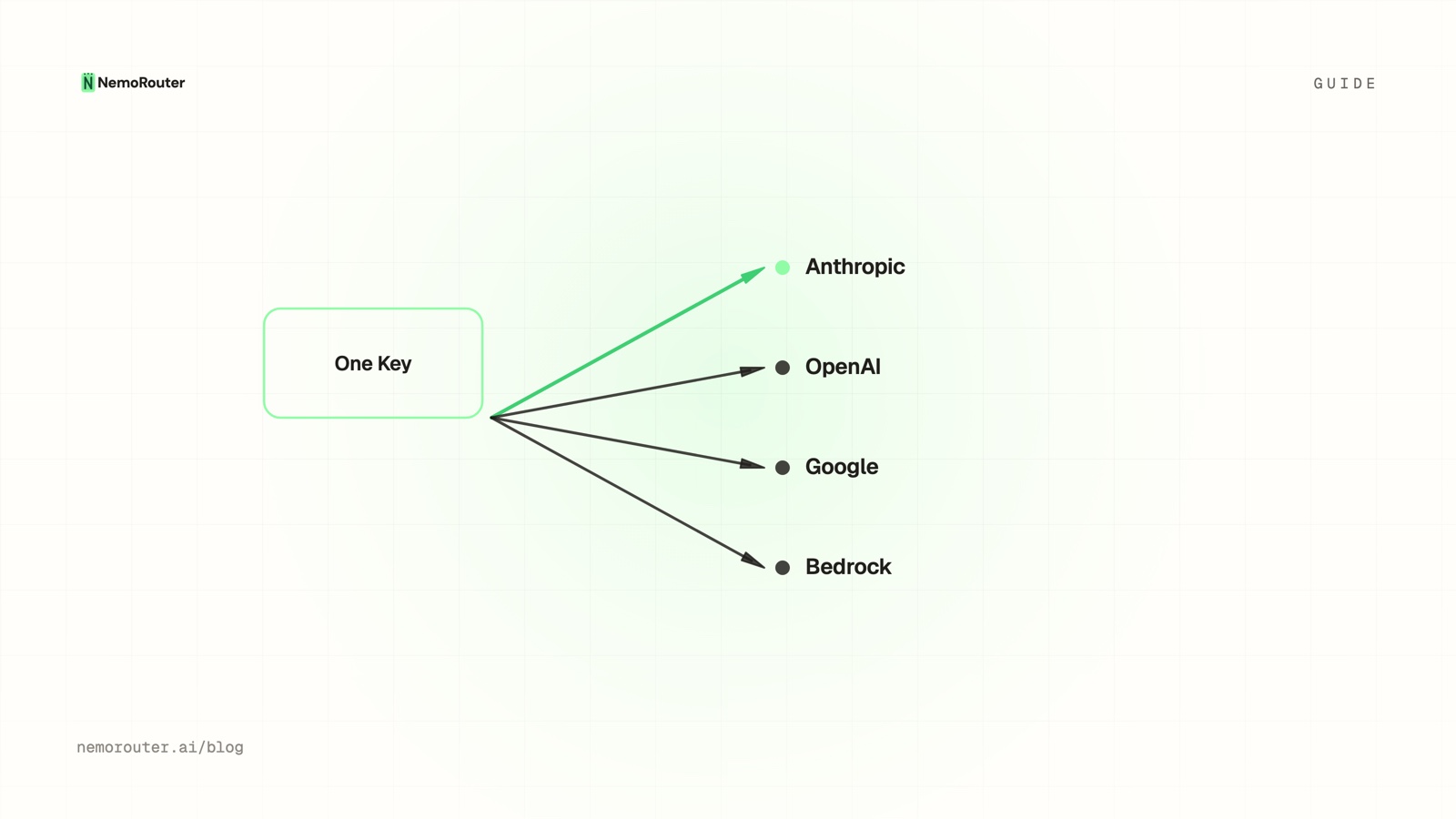
The short answer: the work between a demo and a production AI feature is not the model. It is a provider account, an SDK, a spend ceiling and a log. Through a gateway all four collapse into: fund an organization, create a scoped virtual key, change
base_urltohttps://api.nrouter.ai/v1, attach a budget to the key, and readx-nr-request-costoff the first response.
The short answer
The demo always works. It is the four weeks after the demo that quietly eat a quarter — a provider account waiting on approval, a second SDK to learn when someone asks for a cheaper model, a budget cap that finance wants before the rollout, and request logging that nobody built until the first surprise invoice arrived.
None of that is your feature. It is the tax every team pays to put any model in front of a real user, and it is paid again per provider. This guide is the afternoon version: five steps, each with a command or an exact dashboard field, ending with a call that is capped, attributed, and logged. The end state is not "it returned a completion" — a curl one-liner does that. The end state is a call you can safely leave running when you close the laptop.
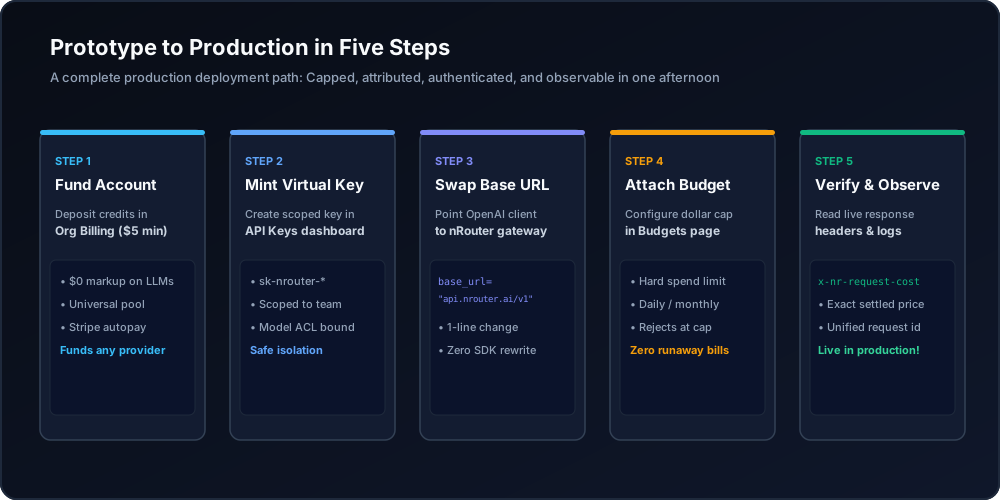
Figure 1: Five-step production deployment workflow: funding, scoped keys, base URL swap, spend caps, and observability.
When you need this
You have a working prototype and no idea what it will cost in production. The prototype ran on a personal key with no ceiling. Before it can serve real users somebody has to answer "what stops this from spending $9,000 in a weekend", and right now the honest answer is "nothing".
Product asked to try a second model and you quoted two weeks. That estimate is not about the model. It is about a second account, a second SDK, a second set of credentials in your secret manager, and a second billing dashboard that has to be reconciled against the first at month end.
Somebody asked which team the spend belongs to and the answer was a shrug. One shared key means one undifferentiated line item. Attribution is not something you can backfill; it has to exist at the moment the request is made, which means it has to exist before you launch. The mechanics of doing that properly are in Attribute LLM spend by team, customer, and feature.
If any of those is true, the constraint on your ship date is governance, not capability — and governance is a configuration problem, not a build.
What you need first
Four things, and three of them take under five minutes.
- A funded organization. Signup is card-required and takes a real charge; the minimum credit purchase is $5. There is no BYOK step here: you never paste a provider key, because nRouter holds the provider credentials. The reasoning is in Why we don't do BYOK. Start at app.nrouter.ai/signup; the fee that rides on top is on Pricing.
- A terminal with
curl, or Python/Node with the OpenAI SDK already installed. You are not adding a dependency. That is the point of step 3. NROUTER_API_KEYexported, which step 2 produces. Every code block below is runnable as written againsthttps://api.nrouter.ai/v1.- Owner or admin role if you want to attach budgets at organization or team scope. A key-level budget can be set by whoever creates the key. Roles are laid out in Team Management.
You do not need a provider account, an approval queue, a second SDK, or a credit-card conversation with a vendor's sales team. Skipping that is worth more than it sounds: a direct provider account is a second rate-limit budget to plan around (Anthropic publishes its per-organisation RPM and TPM ceilings at docs.anthropic.com) and a second rate card to reconcile at month end (OpenAI).
Step 1 — Fund the organization and confirm the balance
Credits are the floor under everything else. Before any request leaves the
gateway, the estimated cost of that call is reserved against the organization's
balance; if the balance cannot cover the reservation, the call returns 402 and
no provider is contacted. That is the mechanism that makes a spend ceiling a
ceiling rather than a suggestion, and it is described in
Reserve-and-settle.
Load the first amount on the Billing page (/[organization]/billing). The
$5 floor is a floor, not a menu — anything above it is a number you type. One
thing worth knowing before you pick it:
- The platform fee is charged on top of the amount you choose, so a $5 load puts $5 on the balance and bills the fee separately — on Pay as you go the fee is a flat 4% of the credits, so the card sees $5.20. It is never skimmed off the credits, and every movement lands in the ledger described in How to read your LLM credit ledger.
If a runaway job is a realistic risk in your environment, decide now whether to turn on auto-topup — it removes the "balance hit zero at 2am" failure mode and introduces a different one, which is exactly what Auto Top-Up Without Surprise Bills: Threshold, Amount, Cap is about. You can skip it for an afternoon build and revisit it before real traffic.
Step 2 — Create a scoped virtual key, not a shared one
Go to the Keys page (/[organization]/keys) and click Generate Key. The
temptation at this point is to make one key called api-key and move on. Resist
it for ninety seconds, because the fields on this form are the entire difference
between a leak you revoke and a leak you have an incident review about.
| Field | What to put in it | Why it matters later |
|---|---|---|
| Name | prod-<service>, e.g. prod-ticket-summarizer | The dashboard sorts alphabetically, so the prefix groups environments |
| Team | The team that owns this workload | Spend and limits attribute here; a key belongs to exactly one team |
| Budget | A per-key cap in USD | The ceiling that survives you forgetting about the key |
| Allowed models | Leave empty, or list gpt-5.4-mini | An empty list means everything the team may use |
| Allowed endpoints | Restrict to what the service calls | A summarizer needs /chat/completions and nothing else |
| IP allowlist | CIDR blocks, or blank | Denied requests are rejected before the key is consumed |
| Expiration | Never, 30 days, 90 days, or a datetime | 90 days is the sane default for service-to-service |
The full value is shown exactly once, at creation. After that the dashboard shows the key name and last four characters and nothing else — there is no reveal button, because the full value is not retrievable. Copy it now and put it in your secret manager, not in a Slack message to yourself.
export NROUTER_API_KEY="sk-nrouter-..."   # shown once, at creation
curl -sS https://api.nrouter.ai/v1/models \
  -H "Authorization: Bearer $NROUTER_API_KEY" | head -c 400
A model list means you are authenticated. A 401 means the key is wrong,
revoked, or expired — check Authentication.
The reason one key per (environment, service) pair beats one key for
everything is the whole argument of
Virtual keys vs master key, and it is
worth reading before you get to five services.
Step 3 — Point the SDK you already have at one base URL
This is the step that people expect to be hard and is not. The API implements
OpenAI's
Chat Completions contract,
and OpenAI's own maintained clients — the
Python SDK and the
Node SDK — accept a base_url override,
so the integration is two arguments on a client you already import. There is no
nRouter SDK to install and no second client object to keep in step with your
first one.
import os
from openai import OpenAI

client = OpenAI(
    api_key=os.environ["NROUTER_API_KEY"],
    base_url="https://api.nrouter.ai/v1",
)

resp = client.chat.completions.with_raw_response.create(
    model="gpt-5.4-mini",
    messages=[{"role": "user", "content": "Summarize this ticket in one line."}],
)

print(resp.headers.get("x-nr-request-id"))     # always present — store it
print(resp.headers.get("x-nr-request-cost"))   # may be ABSENT — never default to 0
print(resp.parse().choices[0].message.content)
The same two arguments in Node:
import OpenAI from "openai";

const client = new OpenAI({
  apiKey: process.env.NROUTER_API_KEY,
  baseURL: "https://api.nrouter.ai/v1",
});
Use with_raw_response (or the equivalent in your language) from the first call
rather than retrofitting it later. The response headers carry the request id and
the settled cost, and capturing the request id on every call — success and
failure — is what makes a support ticket a lookup instead of a timestamp hunt.
Language-by-language snippets live under SDKs; if you are inside
LangChain, LlamaIndex, CrewAI or the Vercel AI SDK, the same base-URL swap is
documented per framework at Frameworks.
Step 4 — Attach a budget before you launch, not after
A key with no cap is a key that can spend the whole balance. Create the ceiling
on the Budgets page (/[organization]/budgets) → Create Budget. Three
fields decide the behaviour:
| Field | What it does | Sensible first value |
|---|---|---|
| Budget Name | The label that appears inside the error message | Ticket summarizer — daily |
| Max Spend | The hard cap in USD | Ten times your expected daily spend |
| Duration | Daily, Weekly, Monthly, or Total (never resets) | Daily |
Then pick an enforcement mode. Block rejects at the cap, Warn alerts and keeps serving, Throttle alerts and flags the budget for rate reduction. A production ceiling is Block, with a warn threshold underneath it as the early signal — using Warn alone and calling it a cap is the single most common mistake here.
The scope you attach it to decides the status code you get back, and this catches people:
- Organization, team and user budgets return
402with codebudget_exceeded. - Per-key budgets return
429with codekey_budget_exceeded.
That is not a typo, and your retry logic has to branch on the code field
rather than the status. Both are stock HTTP — 402 is the payment-required status
reserved by RFC 9110 and 429 Too Many Requests is RFC 6585 — so
the status alone cannot tell two very different situations apart: a 429 from a
rate limit clears on its own in seconds, a 429 from a key budget will not clear
until the window resets. The client-side
playbook is Handling 429 and 402 errors.
Pair the dollar cap with an RPM and TPM limit on the same key. A monthly budget is a total and structurally cannot stop a retry loop from consuming it in an afternoon; velocity is a separate control, and the two together are covered in Budgets vs rate limits.
Step 5 — Change the model string, not the integration
Everything up to here was setup you do once. This step is what you bought.
CHEAP = "gpt-5.4-mini"
STRONG = "gpt-5.5"

model = STRONG if ticket.get("priority") == "p1" else CHEAP
resp = client.chat.completions.create(model=model, messages=msgs)
Adding a second model is a string. Adding a provider you have never used is also a string, because the account, the credential and the request-shape translation are not yours. There is no second SDK, no second key in the secret manager, no second invoice to reconcile, and no second cost table to maintain. Browse what is currently servable on Models.
Once more than one model is live in the same code path, the interesting question stops being "does it work" and becomes "which one should get this request" — which is the subject of Cost-vs-Quality LLM Routing: Which Tasks Can Go Cheap, and of Provider fallback chains when the answer needs to survive an upstream outage.
Verifying it worked
Four observable signals, in the order you should check them. Configuration you have never watched fire is a hypothesis.
- The response carried a request id and a cost. Dump the headers:
curl -sS -D - -o /dev/null https://api.nrouter.ai/v1/chat/completions \
  -H "Authorization: Bearer $NROUTER_API_KEY" \
  -H "Content-Type: application/json" \
  -d '{"model":"gpt-5.4-mini","messages":[{"role":"user","content":"ping"}]}' \
  | grep -i '^x-nr-'
You should see x-nr-request-id and, when the call was priceable,
x-nr-request-cost in USD. x-nr-request-cost is absent when a call cannot be
priced — absent is unknown, and code that defaults it to 0.0 will
under-report your own spend while the ledger stays right.
-
The row appeared in the logs. Open
/[organization]/logsand paste the request id into the search box. The row carries the model, token counts, latency, status and settled cost. What a log row should and should not contain is What an LLM request log should contain. -
The ledger moved. The credit balance decreased by the settled cost, and a transaction exists for it. Spend charts and the ledger answer different questions; the ledger is the authoritative one.
-
The cap actually bites. Attach a
$0.01Total budget to a throwaway key, send two calls, and confirm the second returns429withkey_budget_exceededand a message naming the budget. Then delete the throwaway key. You now have a ceiling you have personally watched reject a request, which is a materially different claim from a ceiling you configured.
What goes wrong
You shipped with one key for everything. It works, right up until it leaks or
one workload eats another's headroom. A shared key also destroys per-service
attribution, and attribution cannot be reconstructed after the fact. One key per
(environment, service) pair, always.
You put the budget at organization scope and expected it to protect a team. An org budget is the backstop on the whole account; it will happily let one service consume the entire thing. If the concern is "the batch job must not spend the chat feature's money", the budget belongs on the key or the team. Scope resolution is in Org, team, member.
You defaulted the missing cost header to zero. This one is silent, which is
what makes it expensive. An absent x-nr-request-cost means the call could not
be priced, not that it was free. Treat absent as unknown, and reconcile against
the ledger rather than summing headers.
You retried a budget block with exponential backoff. A 429 carrying
key_budget_exceeded is a policy outcome, not a transient failure. Generic retry
logic will spin against it until the window resets, adding latency and load and
achieving nothing.
You hardcoded the model string in fifteen call sites. The whole benefit of a single integration is that swapping a model is a one-line change. That is only true if the model name lives in configuration. Put it in one place on day one; retrofitting it is a refactor nobody schedules.
Try it
Everything in this guide — per-key budgets, RPM and TPM limits, guardrails,
request logs, A/B tests, prompt management and evals — is available on every
plan. Every plan pays the same 4% platform fee on credits, charged on top, and
plans vary the monthly nrouter/auto allowance (subscriptions from $20/mo) and
the default rate limits, never the feature set. Because the 4% is taken of the
credits, the fee on your monthly spend is 4% of that spend, with no minimum fee;
the arithmetic is on Pricing.
Load the $5 minimum — the platform fee rides on top — then work the five steps above. Start at app.nrouter.ai/signup, or send a first request from the browser in the Playground before you write any code at all.
Stuck on a step? The canonical reference for the same task is Quick Start, and people answer questions in the nRouter community.
See also
- Virtual Keys vs Master Key: Scoping a Key Per Job — why step 2's scoped key matters, and what a leaked key can and cannot do.
- Credits, budgets, rate limits, guardrails: four pre-flight gates — the four independent checks your request clears, and the status code each one returns.
- Handling 429 and 402 errors from an LLM gateway — the client-side half of step 4, so a budget block is never retried like a throttle.
- Cost-vs-Quality LLM Routing: Which Tasks Can Go Cheap — the question that arrives the day after step 5, once two models are live in one code path.
- What an LLM request log should contain — the fields behind the verification step, and the content you should deliberately not keep.
- Migrate Off OpenRouter: The Base-URL Swap and What Does Not Map — the same afternoon, if you already have a gateway and are moving rather than starting.
- Pricing — the platform fee, the credit minimum, and the plan-level rate-limit defaults referenced throughout.
Sources
Verified 2026-06-24; the external references were re-checked on 2026-08-23. Every number, field name, dashboard path and status code above comes from nRouter's own documentation or pricing page. If something has drifted, email hello@nrouter.ai and we will correct it.
- The request contract step 3 speaks, unchanged apart from the base URL: OpenAI Chat Completions reference
- The clients that accept the base-URL override: openai-python, openai-node
- The HTTP statuses step 4's codes ride on: RFC 9110 (
402), RFC 6585 (429) - What a direct provider account would have you manage instead: Anthropic rate limits, OpenAI pricing
- Base URL, key format and the one-time display rule: Authentication
- First call, in curl and in Python: Quick Start
- Key fields — allowed models, allowed endpoints, IP allowlist, expiration, rotation: API Key Management
- Budget scopes, durations, enforcement modes and codes: Budget Controls
- Response headers and error shapes: Chat Completions API
- Plans, platform fee and the $5 credit minimum: nrouter.ai/pricing