The Direct Answer: Uncapped AI infrastructure invoices stem from asynchronous alert lag and uncontrolled agentic loops. nRouter replaces post-facto billing alerts with 4-tier inline budget ceilings across Organization, Team, Member, and Virtual Key scopes. By enforcing atomic Phase 4 credit holds prior to provider egress, runaway agent loops are halted deterministically (HTTP 429 for keys, HTTP 402 for tenants), bounding worst-case financial liabilities to exact operator-defined dollar caps.
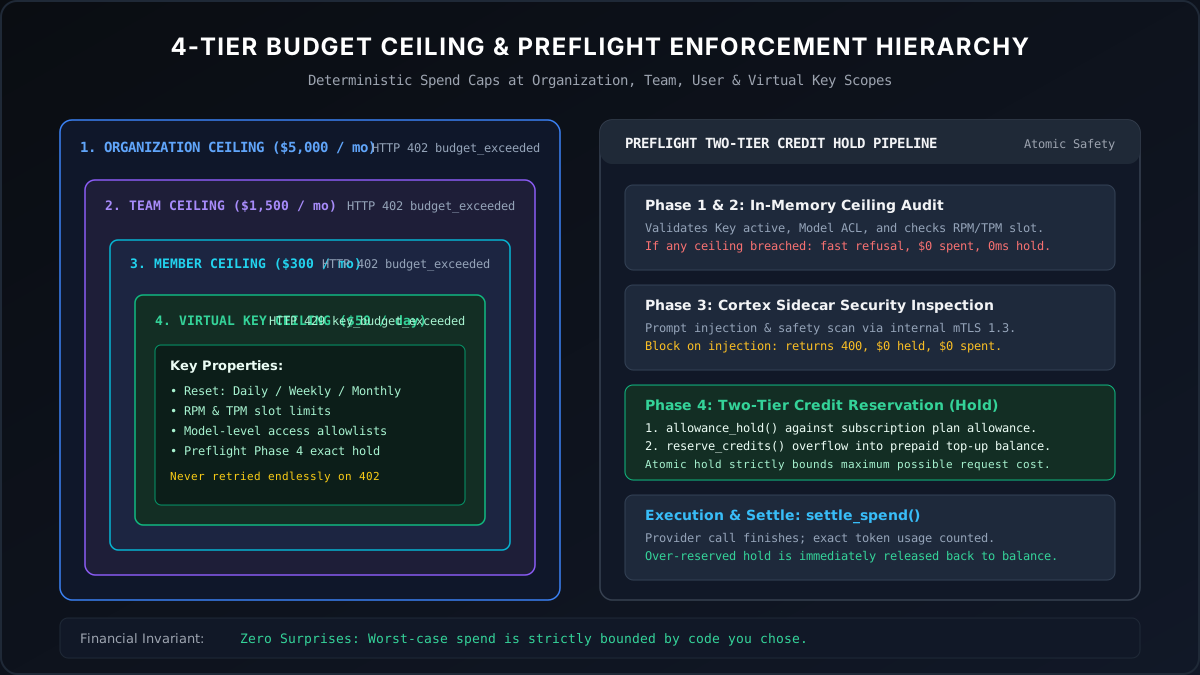
Figure 1: Concentric Budget Ceilings & Preflight Credit Reservation — Halting rogue agentic loops and bounding maximum financial liability before provider execution.
What it does
You set a maximum dollar amount on an organisation, a team, a member, or a single key, over a daily, weekly, monthly or lifetime window. When that amount is reached the next request is refused rather than billed. A forecast built on top of those ceilings has a worst case you chose, not a worst case you discover.
The one-paragraph version: forecasting AI spend by extrapolating last month is a projection of the expected case, and the expected case is not what ruins a quarter. What ruins a quarter is one unbounded event — a retry loop, a fan-out, a launch that goes ten times — and no amount of better extrapolation bounds it. A ceiling in the request path does. Once every scope has one, the forecast stops being "what we think we will spend" and becomes "what we will spend, plus at most this much."
This post is about ceilings and forecasting specifically. Spending less per call is a different lever (routing as a cost lever); splitting the bill across your own customers is a different job again (per-customer billing); and all of it presupposes one seam every call passes through (one key, every provider).
The job it does for you
Before. The controls are alerts and dashboards. An alert is a notification, not a brake — by the time it fires the money is gone, and the honest description of the workflow is "we find out afterwards, faster." So the forecast is built the only way it can be: last month plus a growth factor plus a fudge, presented with a confidence nobody in the room actually has. The finance question that exposes it is always the same one, and it is a fair question: what is the most this can be?
The three events that make the answer "we do not know":
- The runaway job. One loop with no upper bound, one tool call that recurses, one agent that retries on a condition that never clears. Spend tracks the bug, not the demand.
- The successful launch. Demand goes up by an order of magnitude and nothing in the system objects, because nothing was ever asked to.
- The quiet drift. Nobody spikes; five teams each grow 20% and the aggregate grows past the plan without a single alert firing, because no single scope crossed its own threshold.
After. Every scope has a number. The org ceiling is the answer to what is the most this can be. The team ceilings are how the org number is allocated and how drift shows up as a specific team hitting its cap rather than as an aggregate surprise. The key ceilings are how a runaway is contained to one service. And the forecast is a sum of numbers you set, with measured spend telling you where the headroom actually sits.
How it works
A budget is a maximum dollar amount, a reset window, and a scope. All four scopes are independent and they all apply — a request has to clear the ceiling on the key, on the member, on the team, and on the organisation.
| Scope | What it caps | Who sets it |
|---|---|---|
| Organization | Total spend across the whole account | Owners and admins |
| Team | All keys owned by that team | Owners and admins |
| User | One member's spend inside the org | Owners and admins |
| API key | One key — one service, one environment, one customer | The key's owner |
| Duration | Reset behaviour |
|---|---|
| Daily | Resets at midnight UTC |
| Weekly | Resets at midnight UTC on Monday |
| Monthly | Resets on the 1st at midnight UTC |
| Total | Never resets — a lifetime cap |
The status code depends on the scope, and this is the detail most worth committing to memory. Organisation, team and user budgets refuse with 402 and the code budget_exceeded. Per-key budgets refuse with 429 and the code key_budget_exceeded. The difference is deliberate and it is load-bearing for client code: a 429 is the shape a client already retries with backoff, while a 402 is a stop. That split follows the meanings HTTP already gives the two codes — RFC 6585 §4 defines 429 Too Many Requests as "the user has sent too many requests in a given amount of time", a condition that clears on its own, while RFC 9110 §15.5.3 reserves 402 Payment Required for the payment case, which does not. Branch on the code field, never on the status alone, or a per-key exhaustion will be retried forever against a ceiling that does not move until the window resets.
{
  "error": "Team budget 'Data Science — Monthly' (monthly) exceeded: $2000.12 used of $2000.00 limit.",
  "code": "budget_exceeded",
  "request_id": "req_..."
}
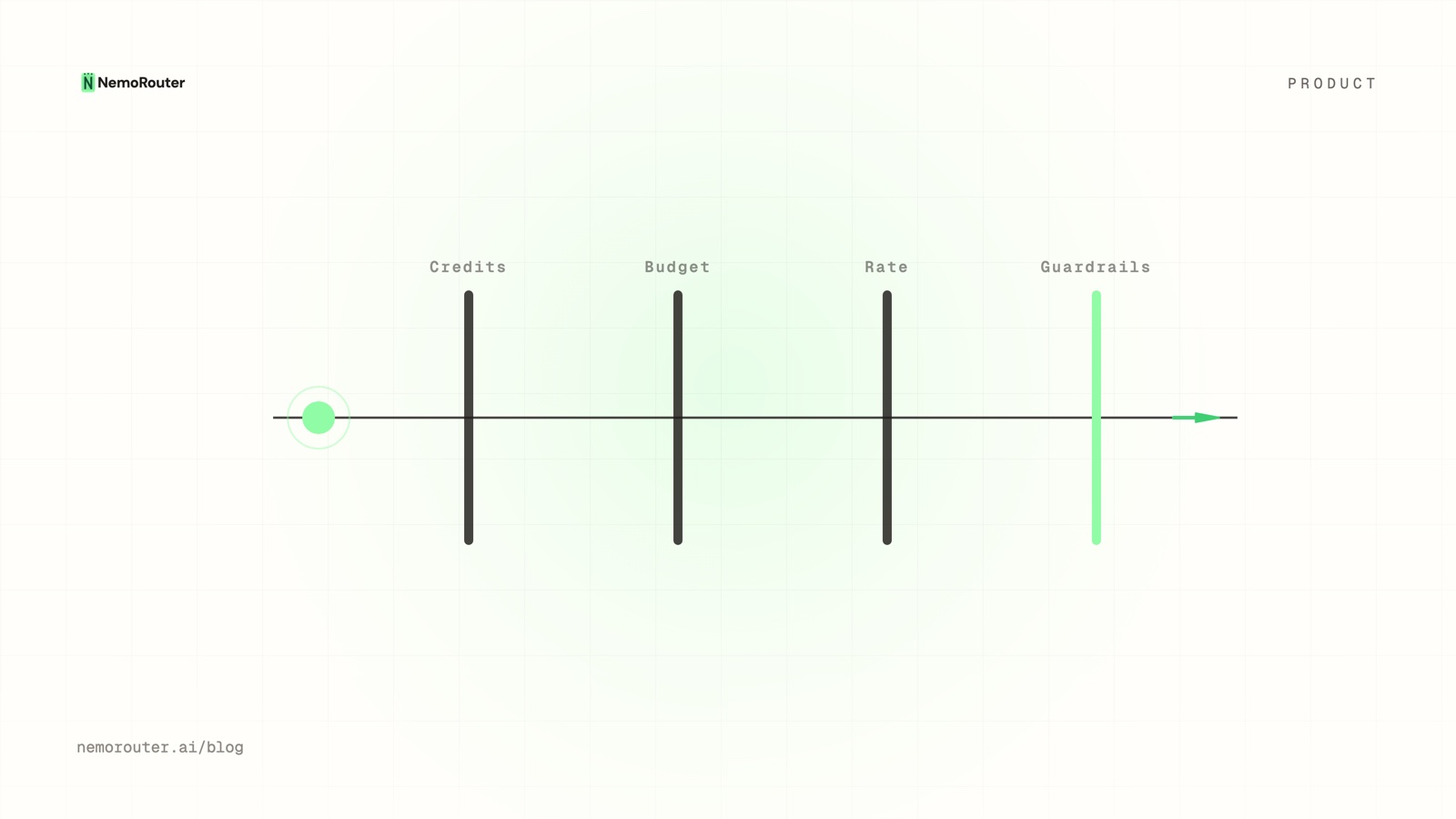
The refusal happens before the provider call, so a blocked request is not a billed request. And because the budget check is only one of several gates a request passes, it is worth knowing the others so you can read a rejection correctly — the four ceilings every LLM request passes walks the credit balance, the budget, the rate limit and the guardrail in order.
Set it up
From the dashboard, the Budgets page takes a name, a maximum, a duration and an assignment:
1. Budgets → Create Budget
2. Name          "Backend API — Monthly"
3. Max Spend     $500.00
4. Duration      Monthly
5. Assign to     a key, a team, a member, or the organisation
In client code, the work is not setting the budget — it is handling the refusal in a way that distinguishes the two shapes:
import os
from openai import OpenAI, APIStatusError

client = OpenAI(
    base_url="https://api.nrouter.ai/v1",
    api_key=os.environ["NROUTER_API_KEY"],
)

try:
    raw = client.chat.completions.with_raw_response.create(
        model="claude-sonnet-4-5-20250929",
        messages=[{"role": "user", "content": prompt}],
    )
    cost = raw.headers.get("x-nr-request-cost")     # absent when unpriced
    status = raw.headers.get("x-nr-cost-status")    # "exact" | "unpriced"
except APIStatusError as e:
    code = (e.response.json().get("code") or "")
    if code == "key_budget_exceeded":               # HTTP 429
        stop_this_key()                             # do NOT back off and retry
    elif code == "budget_exceeded":                 # HTTP 402
        escalate_to_owner()
    elif e.status_code == 429:
        backoff_and_retry()                         # a real rate limit
    else:
        raise
The subtlety in that block is the first branch. A 429 normally means "slow down" — and against a provider directly it usually does, which is why OpenAI's rate-limit guide tells you to back off exponentially. Here key_budget_exceeded means "this key has no allowance left this window" — backing off and retrying will not help and will burn your own retry budget. Handling 429 and 402 is the full client-side treatment, and budgets vs rate limits is how to decide which control the risk you are worried about actually needs.
Building the forecast from measured spend
A ceiling without a measurement underneath it is a guess with a ceiling on it. The sequence that produces a defensible number:
- Measure for a full window. Read
x-nr-request-costoff every response and sum it by scope. One week is enough to see shape; one month is enough to see the monthly pattern. - Split the number by the dimension you allocate on. Team, feature, or customer — attribution tags is how the slice gets built. A forecast allocated on a dimension you cannot measure is not enforceable.
- Find the whale. Spend is rarely proportional to volume. The model that is quietly expensive is usually not the model that is obviously popular, and cost vs usage is the chart that separates them.
- Set each ceiling at measured p95 plus deliberate headroom, not at the mean. A ceiling at the mean fires half the time and gets raised until it means nothing.
- Set the org ceiling below the number that would actually hurt, and above the sum of the team ceilings. The gap between those two is the only place an unplanned event can live.
- Re-measure next window. A ceiling that never fires may be correct or may be irrelevant; the one that tells you something is the one that fires occasionally and gets a decision made about it.
Step 5 is the one worth arguing about internally. If the team ceilings sum to exactly the org ceiling, the first team to grow blocks the last team to grow, and the failure lands on whoever was unlucky rather than on whoever caused it. Deliberate slack at the org level is what converts that into a signal instead of an outage.
Worked example with numbers
A team forecasting $6,000/month, decomposed into ceilings. Measured spend is the trailing month; the ceiling is p95 plus headroom.
| Scope | Measured last month | Ceiling set | Headroom | What the ceiling contains |
|---|---|---|---|---|
Key: prod-assistant | $2,410 | $3,000 | 24% | A retry loop in the main product path |
Key: prod-batch | $1,180 | $1,500 | 27% | An overnight job that fans out |
Key: staging | $95 | $200 | 111% | A test that hits production rates |
| Team: platform | $3,685 | $4,700 | 28% | Drift across the three keys above |
| Team: research | $1,020 | $1,800 | 76% | Experiments, deliberately loose |
| Organization | $4,705 | $6,500 | 38% | Everything, including what nobody predicted |
Illustrative figures. Substitute your own measured spend — the structure is the transferable part.
Read the bottom row as the forecast's answer to what is the most this can be: $6,500, because the organisation ceiling refuses the next request past it. Note that the team ceilings sum to $6,500 as well while the org ceiling is also $6,500 — that is deliberate: either team can consume the other's unused allowance up to the org number, but the org number is absolute. Note also that staging carries 111% headroom on a tiny base, because the cost of a staging ceiling firing at 3am is high and the cost of setting it generously is $200.
What the table does not do is make the $6,000 forecast accurate. It makes it bounded. Those are different claims and conflating them is how forecasting discipline gets abandoned after the first month where the expected case was wrong.
What happens the moment a ceiling bites
Predictability is only useful if the failure is graceful, so it is worth being explicit about the shape of the event.
- The request is refused before the provider call. You are not billed for a blocked request.
- The refusal carries the scope in the message and the code in the body, so the on-call engineer knows within seconds whether this is one key, one team, or the whole account.
- Nothing else is affected. A team hitting its ceiling does not touch another team's traffic, which is the entire point of putting the ceiling below the org level.
- Recovery is a deliberate act. Someone raises the limit or waits for the window to reset. There is no automatic escalation that quietly re-enables spending, because an automatic escalation is a ceiling that does not exist.
- A separate failure mode is running out of credit entirely, which is an account-level event rather than a policy one and is treated as a billing signal — see auto-topup without surprise bills for the version of that where the account tops itself up, and the reasons to bound it.
What it costs
Budgets are not an enterprise upsell. They are on every plan, alongside guardrails, A/B tests, prompt management, evals and per-team limits. The platform fee — a flat 4% of your credits on every plan, added on top of the credits you buy, with no minimum fee — rides above your ceiling rather than inside it, which is the detail that decides what a bounded month actually costs; the pricing page carries the table.
The fee belongs in the forecast rather than beside it, and it is the one line that behaves differently under a ceiling: the fee on the $6,500 org ceiling is $260.00 (buying $6,500 of credits is a $6,760.00 charge, and the fee is 4% of the credits), so the true bounded worst case in the worked example is $6,760.00 — on every plan, because every plan pays the same 4%. A subscription adds its own fixed monthly line on top of that, and buys a monthly nrouter/auto allowance and higher limits rather than a lower fee — from credits to Pro works through when that is worth it.
None of it is free to begin with: the account opens with a card and a real $5 minimum charge carrying the platform fee on top.
Where it fits with the rest of the platform
- The other gates. A budget is one of four things a request passes; knowing all four is how you read a rejection correctly — the four ceilings every LLM request passes.
- The other control. A budget bounds money over a window; a rate limit bounds throughput per minute. A tight retry loop needs the second even when the first is what worried you — RPM and TPM rate limiting.
- The scopes themselves. Ceilings hang off the org/team/member hierarchy — org, team, member.
- The money underneath. Credits are reserved before the call and settled after it, which is why a blocked request cannot overspend — reserve and settle.
- Non-text calls. Image, video and audio requests have cost floors of their own worth knowing before you set a ceiling that assumes text pricing — multimodal cost safety.
Limits and what it will not do
- A ceiling is not a forecast. It bounds the worst case. Being accurate about the expected case is still measurement work, and step 1 of the forecast section is not optional.
- Windows reset on UTC boundaries, not on your billing cycle or your timezone. A monthly budget resets on the 1st at midnight UTC regardless of when your invoice closes.
- An in-flight request is not retroactively refused. The check happens before the call; a request already at the provider completes and settles.
- A ceiling set at the mean will be raised until it is meaningless. This is a human failure mode rather than a product one, and it is the most common way budgets stop working.
- Org, team and user budgets are owner-and-admin controls. A member cannot set the ceiling that binds them, by design.
- Alerts still matter. A ceiling is the last line, not the first. You want to know at 70% too, not only at the refusal.
- SOC 2 Type II is in progress, not certified. The trust page carries the current posture.
Try it
Create an account at signup, load the $5 minimum (platform fee on top), then do the one test that proves the whole post: create a key, put a $1 monthly budget on it, and send requests until it refuses. Read the status and the code off the rejection and confirm your client branches correctly. That takes about fifteen minutes with the quick start and the budget controls guide, and a ceiling you have watched fire is worth more than a ceiling you configured and trusted.
See also
- The four ceilings every LLM request passes — the credit balance, budget, rate limit and guardrail gates in order, with the code each returns.
- Budgets vs rate limits: pick the control, then set both — choosing between bounding the money and bounding the speed, and why you usually want each.
- Handling 429 and 402 errors from an LLM gateway — the client code that tells a per-key exhaustion apart from a real rate limit.
- Attribute LLM spend by team, customer, and feature — how the forecast gets a dimension you can actually allocate on.
- Auto top-up without surprise bills: threshold, amount, cap — the account-level failure mode a budget does not cover.
- Reserve-and-settle: never overspend a credit balance — why a refused request cannot become a charge.
- Pricing — the platform fee that belongs inside the bounded worst case, in its live form.
Sources
Verified 2026-08-23. If any linked page has changed since, email hello@nrouter.ai and we will correct this post.
- nRouter plans and fees: nrouter.ai/pricing — a platform fee of 4% of your credits on every plan, from $0 pay as you go to Starter ($20/mo), Pro ($50/mo) and Max ($200/mo), $5 minimum purchase.
- nRouter budget controls documentation: nrouter.ai/docs/guides/budget-controls — scopes, durations, and the status code each scope returns.
- OpenAI API reference: platform.openai.com/docs/api-reference — the error-handling shape the client examples build on.
- Anthropic pricing: anthropic.com/pricing — published per-model rates behind the illustrative spend figures.
- AWS Bedrock pricing: aws.amazon.com/bedrock/pricing — Bedrock is live on nRouter and AWS publishes its own rates.
- RFC 9110 §15.5.3,
402 Payment Required: datatracker.ietf.org/doc/html/rfc9110 — the HTTP semantics behind the code an org, team or user ceiling returns. - RFC 6585 §4,
429 Too Many Requests: datatracker.ietf.org/doc/html/rfc6585 — the code a per-key ceiling returns, and the retry expectation it carries. - OpenAI rate-limit guide: platform.openai.com/docs/guides/rate-limits — the exponential-backoff convention the third branch of the handler follows.
OpenAI, Anthropic and AWS are trademarks of their respective owners. nRouter is not affiliated with or endorsed by them. All claims above are sourced from their public pricing or documentation on the date shown.