

Organization Settings
Manage organization workspace settings, team branding, audit privacy controls, enterprise SSO security policies, and default localization preferences.
Last updated
The Settings area is where owners and admins configure the organization. It's split into focused sections.
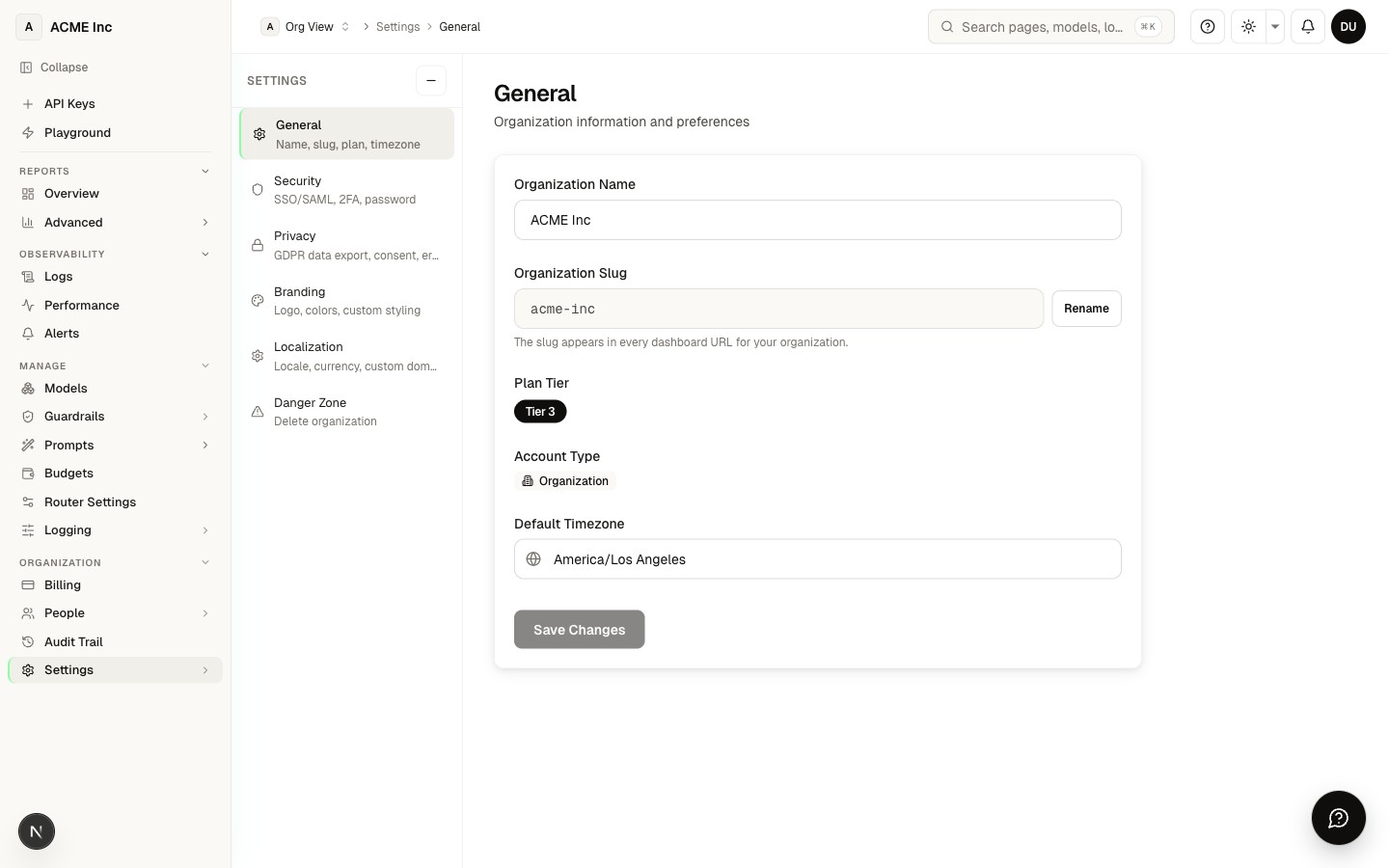
General
/settings — the basics:
- Organization name and slug (your dashboard URL; renaming the slug is a confirmed, one-way action)
- Timezone (preset list across US, EU, Asia, and Pacific)
- Your plan tier label and account type (Individual or Organization, which is convertible)
- A shortcut to billing & features
Branding
/settings/branding — make the dashboard yours:
- Upload a logo (drag-and-drop or file picker) with live preview
- Pick a primary brand color from a WCAG-safe palette or enter a custom hex (theming of branded surfaces is coming soon — the dashboard keeps its neutral theme today)
Privacy & data policy
/settings/privacy — GDPR-aligned controls:
- Data access — download a JSON export of your personal data (GDPR Art. 15/20)
- Consent records — Privacy Policy, Terms of Service, Marketing, and Data Processing, each with version and timestamp
- Erasure — request deletion of your organization data (owner-only, GDPR Art. 17)
Note: logging level is configured under Data Policy (Manage → Logging), and PII redaction is a Localization control that is not yet enforced (see below).
Response caching is a per-request privacy control
Its organization toggle lives in Router Settings and under Settings → Privacy, and it belongs in the same conversation. With caching on, a completed response can sit for a few minutes in a short-lived serving cache, keyed to your organization and team, so a byte-identical repeat request skips the provider call. It is a cache and not a record — not queryable, not exported, separate from your request log, and gone on its own.
Caching is on by default for identical non-streaming requests to /v1/chat/completions, /v1/completions, /v1/responses and /v1/messages; streaming requests are never cached. Your organization can switch it off for every request in Router Settings or under Settings → Privacy, and a single call can stay out of it by sending nrouter_cache: false in the JSON request body: that request is neither answered from the cache nor written into it, and the response carries x-nr-response-cache: bypass so you can verify it. Opting out costs you the provider round trip on every such call, not money — a cache hit is metered and billed like any other request. See Router Settings › Response caching.
Security
/settings/security — protect access:
- Reset password
- Two-factor authentication (TOTP authenticator app) — enroll, name, and remove your own factors. See Two-Factor Authentication
- SSO configuration and SCIM tokens for enterprise provisioning
- Active sessions review
Organization-wide require 2FA enforcement is configured on the Team Management (Members) page, not here — this section covers your own account security.
Localization
/settings/localization:
- Locale (BCP 47) — 12 presets, saved as a display preference
- Currency (ISO 4217) — 8 presets with symbols
- Favicon upload (coming soon — activates with custom-domain serving)
- Custom-domain CNAME instructions (coming soon — domain routing is in development)
- Log retention and PII redaction privacy controls (coming soon — not yet enforced; logs are retained 90 days today)
Danger zone
/settings/danger-zone:
- Delete organization — irreversible. The org must have a single member (empty your team first), and you confirm by typing the org slug. After deletion you're returned to the sign-in page.
Most settings require owner or admin permission. Members and viewers see a read-only view.
Next steps
- Two-Factor Authentication — Set up MFA from Security
- Team Management — Invite members and assign roles
- Audit Log — Settings changes are recorded here
FAQ
Who is allowed to change organization settings?
Most settings require owner or admin permission. Members and viewers get a read-only view, so they can see how the workspace is configured but can't modify the name, branding, security, or other org-level controls.
What happens when I rename my organization slug?
The slug is your dashboard URL, so renaming it is a confirmed, one-way action — once changed, the old URL no longer points to your workspace. Update any bookmarks or saved links after you rename it.
Can I put my own logo and brand color on the dashboard?
You can upload a logo (drag-and-drop or file picker) with a live preview on Branding, and choose a primary brand color from a WCAG-safe palette or a custom hex. Theming the dashboard with your brand color is coming soon — today the dashboard keeps its neutral theme.
How do I download a copy of my personal data?
The Privacy & data policy section gives you a JSON export of your personal data, aligned with GDPR Article 15/20. The same section also shows your consent records — Privacy Policy, Terms of Service, Marketing, and Data Processing — each with its version and timestamp.
What controls how much request data is logged?
The logging level (zero / metadata / full / PII-redacted) is set under Data Policy (Manage → Logging) and is what Observability honors. Today only request metadata (model, tokens, cost, latency) is logged — request/response content is never stored (a privacy-safe default), and Full Logging (capturing that content for debugging) is coming soon. A separate PII redaction privacy control lives under Localization but is not yet enforced (coming soon). Logs are currently retained for 90 days.
Can I require two-factor authentication for everyone in my organization?
Yes — organization-wide "require 2FA" enforcement is turned on from the Team Management (Members) page, and each person enrolls a TOTP authenticator app (see Two-Factor Authentication). The Settings → Security section covers your own account: password reset, active-session review, and managing your individual authenticator factors.
Does nRouter support SSO and SCIM for enterprise provisioning?
Yes — the Security section includes SSO configuration and SCIM tokens for provisioning users at scale. These sit alongside 2FA and session controls as part of your access-protection setup.
Can I change the currency and locale, and does that affect what I'm billed?
You can set your locale (BCP 47, 12 presets) and currency (ISO 4217, 8 presets with symbols) under Localization, which controls how values are formatted and displayed. This is a display preference — it does not change the currency your account is actually charged in.
How do I delete my organization, and can I undo it?
Deleting an organization is irreversible. It's only allowed when the org has a single member — so empty your team first — and you confirm by typing the org slug, which the system verifies before proceeding; afterward you're returned to the sign-in page.
Are changes I make in Settings recorded anywhere?
Yes. Settings changes are captured in your Audit Log, so owners and admins can review who changed what and when.
Can I stop my prompts and responses from being cached?
Yes, for the organization or per request. Caching is on by default for identical non-streaming requests: a completed response can sit for a few minutes in a short-lived serving cache, keyed to your organization and team, so a byte-identical repeat skips the provider call. Streaming requests are never cached. Switch caching off for the whole organization in Router Settings or under Settings → Privacy, or send "nrouter_cache": false in the JSON request body and that one call is neither served from the cache nor added to it, with x-nr-response-cache: bypass on the response confirming it. The per-request field lets you opt out only the calls that need it. The cache is separate from your request log, which never carries prompt or completion content at all — see Router Settings › Response caching and Observability & Logs.
Team Management
Invite team members, assign role-based access permissions, and manage granular user privileges across workspaces and departments in your nRouter organization.
Audit Log
Track organizational security events with nRouter audit logs. Inspect detailed user actions, key changes, and permission edits with export to SIEM platforms.