The Direct Answer: Kong's AI plugins run inside the data plane you already operate—leaving your team responsible for decK declarative YAML schemas across 23 plugins, Redis cluster maintenance for rate limits, KMS vault synchronization for BYOK credentials, and enterprise subscriptions for audit logs. nRouter is a host-neutral, fully managed AI gateway with 0% token markup, built-in prompt injection defense, 4-tier budget ceilings, and zero infrastructure overhead.
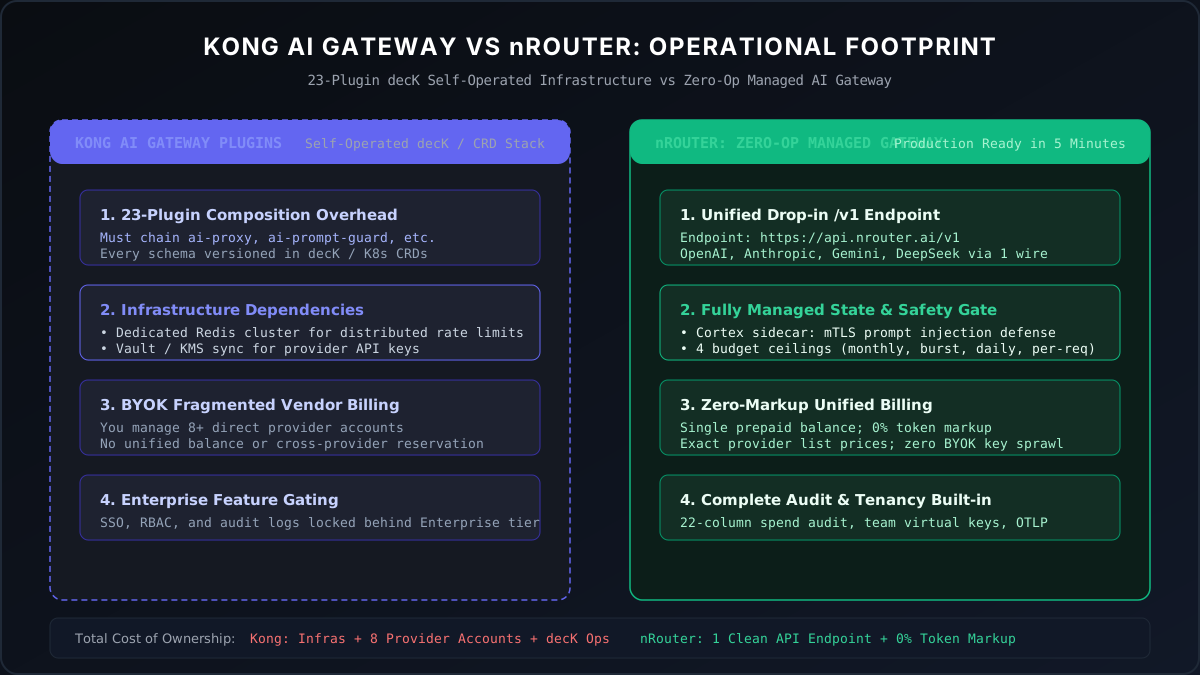
Figure 1: Operational Footprint — Chaining 23 Kong plugins and operating Redis/Vault clusters vs nRouter's unified, zero-op managed data plane.
Almost nobody types "Kong AI Gateway alternative" cold. The people who type it are already running Kong Gateway, Konnect, or Kong Enterprise in front of their REST and gRPC traffic, LLM calls have started flowing through the same edge, and someone has asked the reasonable question: do we enable the AI plugins, or do we put a purpose-built LLM gateway behind Kong and let Kong keep doing what it is already good at?
That is a narrower question than "which product is better," and it has a
narrower answer. Kong is an excellent API gateway. The AI plugin family is a real
and unusually broad extension of it — as of the check below, Kong publishes 23
plugins in the AI category, from ai-proxy and ai-prompt-guard through
ai-semantic-cache, ai-rag-injector, ai-llm-as-judge and an MCP proxy. If
your instinct is "we already have a gateway, why buy a second one," that instinct
is defensible and this post is not going to pretend otherwise.
What this post does instead is enumerate what stays on your side of the line
after enabled: true, because that is the part the plugin list does not show
you, and it is the part that decides the question.
The plugin chain you have to author
Kong's AI capabilities are composed, not configured once. A production LLM path is a chain of plugins, ordered along the request lifecycle, each with its own schema, and each declared in the same decK YAML (or Admin API call, or Terraform resource, or Kubernetes CRD) as the rest of your gateway config. A minimal governed path looks roughly like this:
# deck.yaml — abridged; every key here is a thing you own and version
services:
  - name: llm
    url: http://localhost:32000
    routes:
      - name: chat
        paths: ['/chat']
    plugins:
      - name: ai-proxy
        config:
          route_type: llm/v1/chat
          auth:
            header_name: Authorization
            header_value: 'Bearer ${OPENAI_KEY}'   # <- your provider key, here
          model:
            provider: openai
            name: gpt-5.5
      - name: ai-prompt-guard
        config:
          deny_patterns: ['(?i)ignore previous instructions']   # <- one pattern, one attack shape
      - name: ai-rate-limiting-advanced
        config:
          window_size: [60]
          limit: [200]
          strategy: redis          # <- a Redis you run, or the request fails open/closed
Four things are worth naming about that block, because each of them is a recurring cost rather than a one-time setup:
- Every provider is a separate
ai-proxyconfig. The plugin supports 15+ providers — OpenAI, Azure OpenAI, Bedrock, Anthropic, Vertex, Cohere, Mistral, DeepSeek, Ollama, vLLM and more — but each one you add is another service, another route, another auth block, another model mapping to keep current as that provider renames its models. - The chain order is yours to get right. A guard that runs after the proxy is decoration. Kong gives you the ordering primitives; nothing checks that your ordering expresses the policy you meant — and the deny-pattern above covers one line of the OWASP Top 10 for LLM Applications, not the list.
ai-rate-limiting-advancedwants a Redis. Counters have to live somewhere shared across data-plane nodes; Redis documents the shared-counter rate-limiter pattern itself, which is a reminder that this is a stateful service you now run, not a library you link. That is another dependency in the path of every LLM call, with its own failure mode and its own on-call.- The version floor is real.
ai-proxyrequires Kong Gateway 3.6+, so "enable the AI plugins" can quietly mean "schedule a data-plane upgrade first."
None of that is a criticism of Kong's design. It is what a plugin architecture is: maximum control, in exchange for you being the integrator. The question is whether you want to be the integrator for the LLM slice specifically.
Where the provider credentials end up
This is the single most consequential difference, and it is easy to miss because it looks like one line of YAML.
In ai-proxy, upstream authentication is configured in the plugin. Kong
authenticates to the model provider on behalf of the Kong consumer, using
credentials you place in config.auth (with allow_override available if you
want callers to pass their own). So your OpenAI, Anthropic and Bedrock
credentials live in your Kong configuration — which means they live in your decK
repository, your secret store, your CI pipeline, your Konnect control plane, and
every data-plane node that renders that config.
That is a normal and well-understood pattern for an API gateway. It is also a key-custody decision, and it comes with the ordinary key-custody chores: rotation across every environment, blast-radius containment when one leaks, and an answer for "which service was using the key we just rotated."
nRouter takes the other side deliberately. There is no bring-your-own-key path: a customer holds one nRouter key and a credit balance, and nRouter holds the provider credentials. The full reasoning, including what that costs you, is in No BYOK: One nRouter Key Instead of Ten Provider Keys — it is a real trade, not a free win, and the post argues both sides.
The practical shape of the difference:
| Kong AI plugins | nRouter | |
|---|---|---|
| Who stores the provider key | You, in plugin config | nRouter |
| Rotation surface | Every environment's decK/Konnect config | None on your side |
| Per-caller credential | Kong consumer + plugin auth | A virtual key you mint and revoke |
| Revoking one team's access | Consumer/ACL change, redeploy config | Revoke that key |
If you want the per-caller half of that in detail, Virtual Keys vs Master Key: Scoping a Key Per Job walks through issuing one key per service and what to scope onto it.
What Konnect meters, and what nRouter meters
Kong Konnect's Plus tier is charged per gateway per month and includes 1 million API requests per month, with additional millions billed at $200 each. SSO and audit logging sit in the Enterprise tier. nRouter meters nothing per request: it adds a platform fee when you buy credits for models, which is 4% of your credits on every plan, with no minimum fee — the whole plan table is on /pricing, and the reasoning behind never gating a feature by plan is in Every Feature on Every Plan.
The number that matters against Kong is not the fee. It is the unit. Kong meters requests through a gateway; nRouter meters dollars spent on models. Those diverge hard in opposite directions:
Whichever gateway does the limiting, the wire answer is the same one RFC 6585 defines for 429 Too Many Requests; what differs is which counter had to be true for it to fire.
- Many small calls, cheap models. A million requests a month against
gpt-4.1-nanoorclaude-3-5-haikumight be a few hundred dollars of model spend. Request-metering charges you for the volume; spend-metering barely registers. - Few large calls, frontier models. A hundred thousand long-context calls to
gpt-5-proorclaude-opus-4-5is a small number of requests and a large bill. Request-metering barely registers; spend-metering is the one you feel.
Work out which shape your traffic is before comparing anything else. It changes the answer more than any feature row will.
The other line worth pulling out of Kong's tier structure: audit logging is an Enterprise feature. On nRouter, "who rotated that key, and when" is a query any customer can run on any plan — the mechanics are in Who Rotated That Key? An Audit Trail That Answers in One Query and the surface is documented at /docs/guides/audit-log. If your reason for enabling the AI plugins is compliance evidence, price the tier that actually carries the evidence.
Side-by-side: who operates what
| Concern | Kong AI Gateway | nRouter |
|---|---|---|
| Runs where | Your data plane — on-prem hybrid, DB-less, traditional, or Konnect cloud/serverless | Managed endpoint at https://api.nrouter.ai/v1 |
| Configured with | decK YAML, Admin API, Konnect API, KIC, Terraform, Operator | Dashboard or REST, no redeploy |
| Provider credentials | In plugin config, held by you | Held by nRouter |
| Rate-limit state | Redis you operate (for the advanced plugin) | Included, per key/team/org |
| Audit logging | Enterprise tier per Kong's pricing page | Every plan |
| Guardrails | ai-prompt-guard, ai-pii-sanitizer, ai-semantic-prompt-guard, plus vendor guardrail plugins | Included, every plan |
| Non-LLM traffic (REST, gRPC, GraphQL) | First-class — the actual product | Out of scope, by design |
| Upgrade cadence | Yours; ai-proxy needs Gateway 3.6+ | Ours |
Kong, Kong Gateway, Kong Konnect and Kong AI Gateway are trademarks of Kong Inc. nRouter is not affiliated with or endorsed by Kong Inc. Every Kong claim above is sourced from Kong's own developer portal and pricing page on the dates listed in the sources below; if any have changed, email hello@nrouter.ai and we will update the post.
Cost per request: a metric you scrape vs a header you read
Kong's AI plugins emit analytics into Kong's own telemetry pipeline, which is the right place for them if your dashboards already live there — you scrape or stream them like any other Kong metric.
nRouter puts the cost on the response, so the calling code can see it without a second system:
curl -sS -D- -o/dev/null https://api.nrouter.ai/v1/chat/completions \
  -H "Authorization: Bearer $NROUTER_API_KEY" \
  -H 'Content-Type: application/json' \
  -d '{"model":"claude-sonnet-4-5-20250929","messages":[{"role":"user","content":"hi"}]}'

# x-nr-request-id: 01JB...
# x-nr-request-cost: 0.00042
# x-nr-cost-status: exact
One detail that matters more than it looks: when the cost is not known, the
x-nr-request-cost header is absent — not zero. x-nr-cost-status then reads
unpriced. A gateway that reports an unknown cost as $0 teaches your dashboards
to under-count exactly the calls you most want to catch, which is the argument in
Cost Honesty: Unpriced Is Never $0.
If you already have the Kong observability stack wired and love it, this is a small win. If you are standing the whole thing up for the LLM slice alone, a header your application can read is a shorter path than a metrics pipeline.
What Kong genuinely does better
Three things, and they are not small.
One control plane for all protocols. nRouter fronts LLM calls and nothing else. If your REST, gRPC and GraphQL services already sit behind Kong routes with consumer-scoped auth and shared rate-limit policy, Kong's argument is that LLM calls should be one more route under the same declarative config, reviewed in the same pull request, deployed by the same pipeline. That is a real operational win and we do not have an answer to it, because we are not building an API gateway.
Deployment topology you choose. Kong runs on-prem, DB-less, hybrid, in your Kubernetes cluster, or on Konnect. If your LLM traffic must never leave a particular VPC, or must terminate inside a specific jurisdiction, Kong can be placed where you need it. nRouter is a managed endpoint; we argue that trade in Managed LLM Gateway vs Self-Hosted, and the honest summary is that a hard data-residency requirement is a reason to stay.
Breadth in the AI category itself. Semantic caching, RAG injection, LLM-as-judge, an MCP proxy with OAuth2, and first-party bridges to AWS, Azure and GCP guardrail services are all published Kong plugins. That is a wider surface than we ship, and if a specific one of them is load-bearing for you — semantic caching in particular is a genuine cost lever — you should weigh it as a real capability rather than a checkbox. Two of that list we do ship: response caching, on by default for identical requests, and prompt compression, on by default for qualified models.
Switch cost: two lines, and Kong keeps the route
The migration is not a rewrite because both sides speak the same wire format:
  const client = new OpenAI({
-   baseURL: 'https://gateway.internal/chat',   // your Kong route
-   apiKey: process.env.KONG_CONSUMER_KEY,
+   baseURL: 'https://api.nrouter.ai/v1',
+   apiKey: process.env.NROUTER_API_KEY,
  });
But for a Kong shop the more useful pattern is usually not "replace Kong." It is
Kong in front, nRouter as the upstream: keep your consumer auth, your
cross-cutting rate limits, your observability and your route topology exactly as
they are, and swap the ai-proxy service for an ordinary upstream pointing at
https://api.nrouter.ai/v1. Your callers see no change at all, your decK config
loses the AI plugin chain and the provider credentials in it, and the LLM-specific
governance moves behind the new upstream.
That framing matters because it removes the false choice. You are not deciding whether to keep Kong. You are deciding who owns the LLM-specific half.
Migrating a decK AI config: what maps and what does not
| In your Kong config | On nRouter |
|---|---|
ai-proxy model + provider mapping | Model name in the request body; the catalog is at /models |
ai-proxy config.auth | Nothing — provider credentials are not yours to hold |
ai-prompt-guard deny/allow patterns | Guardrail rules, per key/team/org — /docs/guides/guardrails |
ai-rate-limiting-advanced + Redis | RPM/TPM limits per key, no Redis to run |
ai-prompt-template | Server-side prompt templates with versions and rollback |
| Kong consumers + ACLs | Virtual keys, scoped per service or per customer |
ai-semantic-cache | No direct equivalent — weigh this honestly |
ai-rag-injector, ai-llm-as-judge | No direct equivalent |
| Everything non-LLM in your Kong config | Stays on Kong, untouched |
Two rows in that table say "no direct equivalent." That is the honest shape of the trade: you gain managed credentials, per-plan governance and per-request cost data; you give up two Kong plugins that do things we do not do.
For the rate-limiting row specifically, the behaviour your retry code needs to know about is in 429 vs 402 on an LLM Gateway — a rate limit is worth retrying, a spent budget is not, and they are deliberately different status codes.
When to stay on Kong AI Gateway
Stay if any one of these is true. Not two — one is enough.
- Data residency or network isolation is a requirement, not a preference. A managed endpoint cannot satisfy "traffic never leaves this VPC."
ai-semantic-cacheis already saving you real money, or your workload has the high-repetition shape that would make it save real money.- Your LLM traffic is a small fraction of what Kong already fronts. If LLM calls are 2% of your gateway volume, standing up a second product for them is overhead with no offsetting simplification.
- Your compliance evidence already comes out of Kong Enterprise. If you are paying for the tier with SSO and audit logging anyway, that argument is already sunk.
- You want one declarative config, reviewed in one place. This is the strongest version of the Kong case and it does not require any of the others.
When a Kong shop should still put nRouter behind it
- You want the provider credentials out of your config repository and out of your rotation calendar.
- You need per-customer or per-team spend attribution and hard ceilings, and you would otherwise be building it from rate-limit counters that measure requests rather than dollars.
- You want budgets, guardrails, prompt versioning, A/B tests and audit logging available without matching them to a gateway tier.
- Your LLM traffic is growing fast enough that the AI plugin chain has become a thing one person understands, and that person has other work.
- You want cost on the response of every call rather than in a metrics pipeline you have to correlate afterwards.
If two or more of those land, the Kong-in-front, nRouter-as-upstream pattern is the cheapest experiment available to you: one service definition, no change to any caller.
Try it
Pay as you go starts at $5 — a card is required, the first $5 is a real charge, and the platform fee is charged on top. There is no free tier and we do not pretend otherwise.
→ Create an account, mint a key, and point one Kong service at
https://api.nrouter.ai/v1 as an ordinary upstream. Nothing else in your decK
config has to move.
Bring your Konnect plan and your provider bill to a walk-through and we will do the request-metered vs spend-metered arithmetic against your actual traffic shape. Questions go to hello@nrouter.ai or the public nRouter Slack.
See also
- No BYOK: One nRouter Key Instead of Ten Provider Keys — the key-custody argument in full, including the cases where holding your own keys is the right call.
- Managed LLM Gateway vs Self-Hosted: Why We Carry the Pager — the deployment-topology trade a Kong shop is really weighing.
- Who Rotated That Key? An Audit Trail That Answers in One Query — what audit evidence looks like when it is not a pricing tier.
- Virtual Keys vs Master Key: Scoping a Key Per Job — the replacement for consumer-and-ACL modelling on the LLM path.
- 429 vs 402 on an LLM Gateway — what your retry logic should do differently once budgets are enforced.
- LLM gateway buyer's guide 2026 — the wider category map if Kong is one of several products on your list.
- Pricing — the plan table and the platform fee.
Sources
Verified 2026-08-23. Every Kong claim traces to Kong's own developer portal or pricing page. If a page has changed since, email hello@nrouter.ai and we will re-audit and re-date this section.
- Kong AI plugin catalog (23 plugins in the AI category): developer.konghq.com/plugins
- Kong AI Proxy — provider auth in plugin config, 15+ providers, Gateway 3.6+: developer.konghq.com/plugins/ai-proxy
- Kong Konnect pricing — per-gateway billing, 1M included requests, $200/additional million, SSO and audit logging on Enterprise: konghq.com/pricing
- Kong AI Gateway product page (the older
/products/ai-gatewaypath now 404s; re-checked 2026-08-23): konghq.com/products/kong-ai-gateway - Kong AI Rate Limiting Advanced — the Redis-backed counter strategy: developer.konghq.com/plugins/ai-rate-limiting-advanced
- Kong Gateway documentation — the data-plane and decK config surface the AI plugins sit inside: docs.konghq.com/gateway/latest
- Redis
INCR, including the rate-limiter pattern — the shared counter store the advanced plugin needs: redis.io/docs - OWASP Top 10 for LLM Applications — the threat classes a deny-pattern guard covers only part of: owasp.org
- RFC 6585 §4 — the
429 Too Many Requestssemantics both gateways answer with: datatracker.ietf.org - nRouter pricing: /pricing
- nRouter model catalog: /models